Qatar Post AI — Solution Architecture
How the four Qatar Post solutions are built on the Eloquent platform
Version 1.1 — July 2026 · Prepared by Eloquent for Qatar Post
1. Executive Summary
The four Qatar Post solutions documented in this folder — the Website Assistant, the Branch Assistant, the Internal AI Assistant, and Customs Clearance AI — are not four separate bespoke builds. They are four use cases configured on a single Eloquent platform deployment, sharing one multi-tenant backend, one agents engine, one chat service, one knowledge layer, and one analytics stack.
Each solution is delivered as:
- One or more Eloquent Agents — declarative configurations (goal, system prompt, skills, tools, model) created in the no-code Agent Builder, no platform code changes required.
- A custom front-end surface — a branded UI (public widget, kiosk avatar, internal portal) built with the
@elqnt/*packages, talking to Eloquent over HTTPS/SSE through the API Gateway. - A set of integrations — Qatar Post's own APIs (Track & Trace, Pricing, OTP, Customs Declaration, Office 365) wired in as agent skills/tools or workflow steps.
The platform does the heavy lifting. Streaming chat, tool orchestration, retrieval-augmented answers, document citations, multi-tenancy, analytics, background jobs, and workflow execution are all provided by Eloquent. Qatar Post's investment is in configuration (agents + skills) and presentation (the front-end shells) — not in rebuilding AI infrastructure.
This document maps each solution onto the Eloquent platform architecture. It is grounded in the Eloquent administration guide:
- Platform Overview — core capabilities (agents, workflows, knowledge graph, entities, chat).
- System Architecture — service map, communication patterns, infrastructure.
- Organization & Multi-Tenancy — isolated tenant model.
- Building Agents from the Admin UI — the no-code agent builder.
- Building Custom Agent UIs — the
@elqnt/*packages used to build the Qatar Post front-ends.
2. The Eloquent Platform (the shared backend)
Eloquent is an enterprise AI platform with a microservices architecture: front-end applications, a single API Gateway, backend services, and shared data stores. Everything Qatar Post builds sits on top of this — Qatar Post is one tenant (organization) on the deployment.
Key platform guarantees (from the System Architecture guide):
| Property | What it means for Qatar Post |
|---|---|
| Single entry point | All four front-ends talk only to the API Gateway over HTTPS. Browsers/kiosks never touch backend services or databases directly. |
| JWT-scoped multi-tenancy | Every request carries Qatar Post's orgId in a signed JWT. The gateway enforces tenant context; no cross-org data access is possible at any layer. |
| SSE chat transport | Streaming AI responses use stateless Server-Sent Events — works behind standard load balancers, auto-reconnects, no sticky sessions. |
| Managed service-to-service messaging | Backend services coordinate over an internal message queue. Front-ends and integrations never see NATS/queues — that's fully managed. |
| Self-hosted / data residency | The platform runs on Kubernetes (AKS/EKS/GKE/OKE or on-prem) via Helm, so the Qatar Post deployment can be pinned to a region or installed on-premise. |
3. One Tenant, Many Agents
Qatar Post is a single Eloquent organization. Within that tenant, the four solutions are realized as agents and (for customs) a workflow — all sharing the same knowledge libraries, OTP service, analytics, and isolated data stores.
Notice the reuse: the Website Assistant and Branch Assistant share the same six service-flow tools, the same OTP service, the same public knowledge library. The Branch Assistant is a separate agent only so its prompts can be tuned for the in-branch, voice-first context — it inherits the rest.
4. The Eloquent Agent Anatomy (every surface follows this)
Each solution is an instance of the same agent model. From the Building Agents guide, an agent is a declarative configuration:
Tools execute in one of three modes — this distinction is what makes the Qatar Post service flows work:
| Mode | Runs where | Used by Qatar Post for |
|---|---|---|
sync (server tool) | Backend, via internal messaging | knowledge_search, entity queries, customs API calls |
async (server tool) | Backend, fire-and-forget | Notifications, long jobs |
asyncClient / client-function | The front-end | Opening the side-car wizards (Track, Send, Hold/Forward, PO Box, Pricing, Locator). The agent "calls a tool" → the widget intercepts it → opens a pre-filled form. This is the agent→UI bridge. |
The client-function pattern is documented in the Custom Agent UIs guide ("Client-Side Tool Execution") and is the backbone of the public and branch self-service flows.
5. Solution-by-Solution Mapping
5.1 At a glance
| Solution | Eloquent building block | Custom front-end | Primary integrations |
|---|---|---|---|
| Website Assistant | 1 public agent + 7 skills, client-function tools, OTP, public KB library | Embeddable widget (<script>) built on @elqnt/chat | Track & Trace, Pricing, Forward/Hold, PO Box, OTP, Azure Speech |
| Branch Assistant | 1 kiosk agent (reuses website skills) + 3 branch skills, avatar-state hints | Full-screen Rive-animated kiosk UI on @elqnt/chat | Same QP APIs + Azure Speech + branch peripherals (printer, QID, locker) |
| Internal AI Assistant | Multiple specialist agents, Agent Builder, Knowledge Management + Libraries, Service Desk, Analytics, Projects | Employee chat portal + Admin Console (Eloquent App) | Jira / ServiceNow / webhook ITSM, Office viewers, Web Speech |
| Customs Clearance AI | Workflow engine + document ingestion + entities + KG (HS-code lookup) | Job dashboard + human-review UI | Office 365 inbound email, Azure Form Recognizer, Customs Declaration API |
5.2 Capability → surface matrix
Which Eloquent capabilities each surface leverages:
| Eloquent capability | Website | Branch | Internal | Customs |
|---|---|---|---|---|
| Agents engine (chat) | ✅ | ✅ | ✅ | — |
| SSE streaming chat | ✅ | ✅ | ✅ | — |
| Client-function tools (side-cars) | ✅ | ✅ | — | — |
| Knowledge Base / Libraries | ✅ | ✅ | ✅ | ✅ (HS codes) |
| Document citations | — | — | ✅ | — |
| OTP / light KYC | ✅ | ✅ | — | ✅ (consent) |
| Workflow engine | — | — | — | ✅ |
| Document ingestion / Form Recognizer | — | — | ✅ | ✅ |
| Entities (dynamic CRUD) | — | — | ✅ (tickets, tasks) | ✅ (manifests, declarations) |
| Service Desk / ITSM | — | — | ✅ | — |
| Analytics + CSAT | ✅ | ✅ | ✅ | ✅ (job metrics) |
| Background jobs / scheduler | — | — | ✅ | ✅ |
| Voice (Azure Speech / Web Speech) | ✅ | ✅ | ✅ | — |
5.3 Conversational surfaces — shared request flow
The Website, Branch, and Internal assistants all follow the same runtime flow. The only differences are the front-end shell and the agent configuration:
5.4 Conversational vs. workflow surfaces
Three of the four solutions (Website, Branch, Internal) are conversational agents that share the runtime flow above. Customs Clearance is the exception — it is a workflow, not a chat: an email-triggered pipeline with a human-review gate, built on the workflow engine + document ingestion + entities rather than the chat service. Its end-to-end flow and review UI live in the Customs Clearance AI doc.
6. Front-End Strategy — Widget vs. Custom UI
Eloquent offers two ways to surface an agent. Qatar Post uses both, picking per surface:
| Approach | When | Qatar Post surfaces |
|---|---|---|
| Embeddable widget (no-code, configured in Admin → Embed) | Quick chat bubble, default styling acceptable | Could back a simple internal embed |
Custom UI (@elqnt/chat, @elqnt/agents, @elqnt/kg, @elqnt/api-client) | Full branding, RTL/bilingual, voice, side panels, kiosk, portal embedding | Website Assistant, Branch Assistant, Internal Assistant |
The Qatar Post front-ends are textbook custom UIs as described in the Custom Agent UIs guide: bilingual Arabic/English with RTL, voice I/O via Azure Speech, document-citation side panels, client-side tool execution, and postMessage portal embedding. The guide's own "government organization" reference example (bilingual + RTL + KG client-tools + citation viewer + voice + telemetry + portal embedding) is the same architecture these solutions use.
Why this matters: Qatar Post owns the look, language, and journey; Eloquent owns the protocol, auth, streaming, and state. New surfaces (mobile app via createFetchSSETransport, WhatsApp via createWhatsAppTransport) are additional transports against the same agents — no backend rework.
7. Configure-Don't-Code: What Lives Where
A clear delineation of responsibilities, which is the central message of this architecture:
| Layer | Provided by Eloquent (platform) | Configured / built for Qatar Post |
|---|---|---|
| Infrastructure | Kubernetes, Helm, PostgreSQL, ClickHouse, Redis, message queue, API Gateway | Region / on-prem placement, domains, secrets |
| AI runtime | Agents engine, chat service, SSE, tool orchestration, model providers | Agent goals, system prompts, model selection |
| Knowledge | Ingestion pipeline, embeddings, semantic search, KG, citations | Which documents/libraries (HR, IT, Finance, public KB, HS-code list) |
| Capabilities | Skill/tool framework, workflow engine, entities, scheduler, Service Desk | Which skills per agent, the customs workflow, QP API tool definitions |
| Front-end | @elqnt/* SDK packages, embeddable widget | The branded widget, kiosk avatar, internal portal, review UI |
| Integrations | Connector framework (email, ITSM, webhooks, HTTP API tools) | Qatar Post API endpoints, Office 365 mailbox, OTP/SMS provider |
| Operations | Analytics, chat logs, audit trail, CSAT, multi-tenant isolation | Dashboards Qatar Post staff read; review workflows |
Everything in the right-hand column is configuration and presentation — done through the Admin Console and a front-end app — not modifications to the platform. That is what makes these four solutions fast to deliver, consistent to operate, and cheap to extend.
8. Azure Production Deployment (Landing-Zone Topology)
Section 2 describes the platform in provider-neutral terms. In production for Qatar Post it is deployed on Microsoft Azure using an enterprise landing-zone topology: a shared Hub / Connectivity landing zone centralises network and security services, VNET-peered to a dedicated QPOST AI Landing Zone (Production) that hosts the AKS cluster running the Eloquent services and the Azure AI services the four solutions depend on.
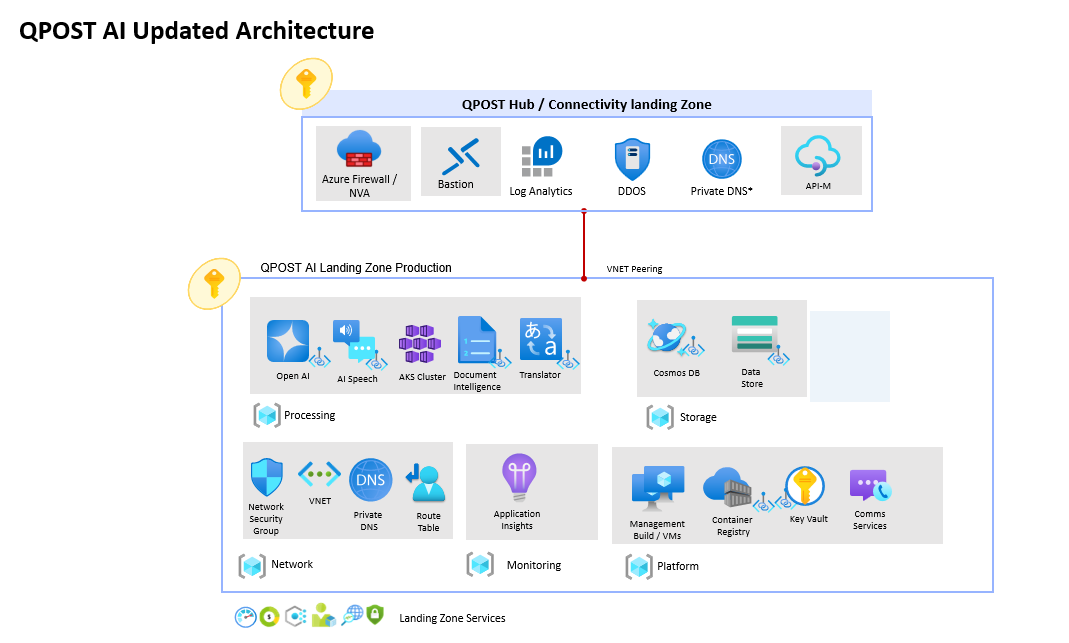
Hub / Connectivity landing zone — shared services fronting the workload: Azure Firewall / NVA, Bastion, DDoS Protection, Private DNS, API Management, and centralised Log Analytics.
QPOST AI Landing Zone (Production) — the workload zone, grouped by function:
| Group | Azure services |
|---|---|
| Processing | Azure OpenAI · AI Speech · AKS cluster · Document Intelligence · Translator |
| Storage | Cosmos DB (Gremlin + Mongo) · data store |
| Network | Network Security Group · VNET · Private DNS · Route Table |
| Monitoring | Application Insights |
| Platform | Management / build VMs · Container Registry · Key Vault · Communication Services |
8.1 Resource inventory
The concrete production resources and how each maps back to the platform capabilities described above. All diagnostics flow to the shared Log Analytics workspaces (la-qpost-hub-qc-001, with security-relevant resources also to la-security-hub-qc-001).
| Azure resource | Resource name | Platform role | Log Analytics |
|---|---|---|---|
| Azure Kubernetes Service | aks-qpostai-prd-sc-01 | Runs all Eloquent backend services, the API Gateway, and the Qatar Post front-end surfaces | la-security-hub-qc-001 · la-qpost-hub-qc-001 |
| Open AI | oai-qpostai-prd-sc-01 | GPT models for chat completions and data extraction | la-qpost-hub-qc-001 |
| Speech Service | spch-qpostai-prd-sc-01 | Voice input/output (Website & Branch assistants) | la-qpost-hub-qc-001 |
| Document Intelligence | di-qpostai-prd-sc-01 | Form Recognizer — customs manifest & declaration extraction | la-qpost-hub-qc-001 |
| Cosmos DB (Gremlin) | cosmos-gremlin-qpostai-prd-sc-01 | Knowledge graph store | la-qpost-hub-qc-001 |
| Cosmos DB (Mongo) | cosmos-mongo-qpostai-prd-sc-01 | Document / entity store | la-qpost-hub-qc-001 |
| Key Vault | kv-qpostai-prd-sc-01 | Secrets, keys, and connection strings | la-security-hub-qc-001 · la-qpost-hub-qc-001 |
| Event Grid system topic | stqpostaiprdsc01-4edd3b08-84fd-4ae4-ae50-eff92696a497 | Storage event notifications | la-qpost-hub-qc-001 |
| Container Registry | crqpostaiprdsc01 | Eloquent + Qatar Post container images | la-qpost-hub-qc-001 |
Everything in this zone corresponds directly to the abstract components in Section 2: AKS hosts the backend services and gateway; Azure OpenAI, Speech, Document Intelligence, and Translator are the model and document providers; the Cosmos DB instances back the knowledge graph and entity stores; Key Vault holds the secrets; the Container Registry serves the images; and Log Analytics provides the observability layer behind the analytics stack.
9. Cross-Cutting Concerns
- Security & isolation — single tenant; per-org PostgreSQL schema + ClickHouse database + Redis key space + queue storage; JWT-enforced org context; API Gateway is the only public surface. (See Multi-Tenancy.)
- Light KYC — OTP service (4-min expiry, 3 resends, single-use token, masked mobile) gates any customer-record mutation across Website and Branch.
- Observability — one analytics stack across all surfaces: chats, messages, active users, token cost per model, tool-usage frequency, conversion funnels, CSAT word-clouds, and per-branch breakdowns.
- Extensibility — a new service flow = one new skill + one client-function tool + one side-car component. A new internal assistant = one new agent in the Agent Builder. A new customs rule = a workflow edit. None require platform changes.
- Portability — agents are exported/imported as JSON; agents are resolved by name (not ID) so the same front-end config promotes cleanly across dev/staging/production.
10. Related Documents
- Website Assistant Requirements
- Branch Assistant Requirements
- Internal AI Assistant Requirements
- Customs Clearance AI Requirements
- Eloquent Administration Guide — Overview · Architecture · Multi-Tenancy · Building Agents · Custom Agent UIs