Qatar Post Website Assistant
Solution & Requirements Document
Version 1.0 — May 12, 2026
Prepared by Eloquent for Qatar Post
1. Executive Summary
This document specifies the Qatar Post Website Assistant, a customer-facing conversational widget embedded on the public Qatar Post website (qatarpost.qa). The widget lets visitors complete the most common Qatar Post services in a single natural-language conversation instead of navigating multiple forms and pages: track a parcel, send a package, hold or forward a delivery, renew a PO Box, calculate postage, and find the nearest branch.
Architecturally the Website Assistant is a custom Eloquent Agent deployed against a dedicated Qatar Post tenant. It uses the same chat engine, knowledge layer, and analytics as the Internal AI Assistant — but the agent is configured for a public, anonymous audience and is wired to Qatar Post’s customer-service APIs through a set of skills and client-side function tools.
Key characteristics:
- Public and anonymous. No login is required; visitors are identified by an auto-generated visitor ID.
- OTP-light KYC. Sensitive actions (changing a delivery address, renewing a PO Box) gate behind a one-time SMS code.
- Full Arabic / English support including bidirectional layout, Arabic voice input and Arabic text-to-speech.
- Six structured service flows exposed as in-chat side-car wizards driven by client-side function tools the agent calls.
- Single embed script that the qatarpost.qa team drops onto any page — no per-page integration work.
- Live operational analytics so Qatar Post Service Operators can see which flows are used, where visitors drop off, and what the assistant is being asked.
The remainder of this document is organised as a solution specification: each section describes what the visitor sees, the supporting capability on the Eloquent platform, and the relevant Qatar Post backend integration.
2. Solution Overview
The Website Assistant runs on the Eloquent platform inside the same tenant that powers the Qatar Post Internal AI Assistant. It exposes one custom agent configured for a public audience and connected to Qatar Post’s customer-service APIs. Three personas are involved:
| Persona | Description | Primary Surface |
|---|---|---|
| Website Visitor | Any visitor to qatarpost.qa — Qatar Post customer or first-time user. Anonymous by default. | Chat widget on any page of qatarpost.qa. |
| QPost Service Operator | A Qatar Post customer-service team member who monitors conversations, handles escalations, and reviews analytics. | Eloquent Admin Console — Chat Log, Analytics. |
| Eloquent Admin | A Qatar Post platform owner with rights to edit the agent’s skills, prompts, and embed configuration. | Eloquent Admin Console — Agent Builder, Library. |
3. End-User Experience
3.1 Widget Entry & Embedding
The Website Assistant is delivered as a single embed script that the qatarpost.qa team adds once to the site template. The script mounts a floating chat bubble at the bottom-right of every page (bottom-left in Arabic-rendered pages) which expands into a chat window on click.
- Embed method: a single
<script src="…/widget.js">tag. No per-page configuration; locale and theme are detected from the host page. - Floating bubble: animated entry; persists across page navigation; survives single-page-app routing.
- Expanded window: 500 × 700 px on desktop; full-height with 70 vw on mobile. Open-from-corner animation. Closes back to the bubble.
- iframe-safe: if the widget is embedded as an iframe on a sub-domain, a postMessage bridge (the “widget messenger”) relays open/close/track events to the parent page.
3.2 Conversational Chat UI
Inside the chat window:
- Header: agent avatar + name, language toggle, close button.
- Message area: streaming agent responses, typing indicator, in-line action chips, knowledge-graph cards (e.g. branch info, product info), tool-call indicators in debug mode.
- Input bar: text input (auto-flips RTL/LTR), send button (rotates 180° in Arabic), microphone for voice input, optional image-attach button.
- Per-message text-to-speech: every agent response carries a speaker icon that reads the message aloud in the visitor’s language.
Streaming, multi-turn context, and conversation persistence per visitor session are all handled by the underlying Eloquent chat engine — the visitor can refresh the page and pick up where they left off within the same session.
3.3 Bilingual Arabic / English
The widget is bilingual by design, not by translation overlay.
- All UI strings, error messages, status badges, and form labels are available in both Arabic and English.
- Layout direction flips automatically: input bar, send-button arrow direction, message-bubble corners, side-car panels, animations.
- Typography uses Exo_2 as the primary face (full Arabic glyph coverage) with IBM Plex Mono for code blocks.
- Language is determined from
?lang=ar|enon the embed URL or from the host page’s<html lang>; the visitor can also toggle in the header.
3.4 Voice Input
The microphone button captures the visitor’s speech, streams it through Azure Speech Services for recognition, and posts the transcribed text as a chat message. Both Arabic and English recognition profiles are supported. Voice input is particularly useful for mobile users on the move (the assistant’s largest audience).
3.5 Text-to-Speech
Every agent response includes a speaker button that reads the message aloud through Azure Speech Services. The voice locale follows the message language. This makes the assistant usable for visitors who prefer listening over reading — common with mobile users and users with limited literacy in a second language.
3.6 General Knowledge Q&A
In addition to the structured service flows in §4, the assistant also answers free-form questions about Qatar Post — service hours, delivery times, customs guidance, prohibited items, international destinations, parcel size limits, postage tiers, and so on. These answers are grounded in the public Qatar Post knowledge base (FAQ, service pages, regulations) ingested into the Eloquent Library.
3.7 AI Brain — Retrieval Transparency Panel
For debugging and for QPost Service Operators reviewing a transcript, the widget supports an AI Brain debug panel that lists every knowledge-base search the agent ran, every tool it called, and the parameters passed. The panel is hidden from regular visitors and exposed under ?debug=true for internal review.
4. Self-Service Request Flows
The flagship capability of the widget is its six structured service flows. Each flow is implemented as a side-car panel that opens beside the chat when the agent invokes the corresponding tool. The agent decides — from the visitor’s natural-language input — which flow to open and pre-fills as many fields as it has captured from the conversation. The visitor can also start any flow explicitly (“track my package”, “I want to send a parcel”).
A common interaction pattern:
- Visitor describes their need in natural language.
- Agent confirms the intent and any parameters it has captured.
- Agent calls the matching client-side tool — the side-car opens with parameters pre-filled.
- Visitor completes any remaining fields, verifies OTP if needed, submits.
- Result returns to the chat as a confirmation message with a tracking number, PDF label, or payment link.
4.1 Track a Parcel
Visitors can track any Qatar Post shipment by either of two inputs:
- Tracking number — direct lookup; no verification needed.
- Mobile number — the visitor receives a one-time SMS code (see §5.2); on successful verification the assistant returns all active shipments associated with that mobile number.
The result panel shows the live event timeline (date/time, branch, status text in Arabic and English), the current status with a colour-coded badge (green delivered, orange in transit, red failed), the recipient’s masked name, and the ETA.
Backend: Qatar Post Track & Trace public API.
4.2 Send a Package
A multi-step wizard that captures everything needed to book a domestic or international shipment:
| Step | Captured |
|---|---|
| 1. Sender | Name, mobile, email, zone, street, building, unit, city (default Doha). |
| 2. Recipient | Same as sender + country (default Qatar) + postal code. |
| 3. Package | Weight (kg), contents description. |
| 4. Service tier | Radio choice of EMS, Standard, or Global Mail. |
| 5. Payment method | Radio choice of Online or Cash on Delivery (COD). |
| 6. Price comparison | Side-by-side rates with Cheapest and Fastest badges; visitor reviews and continues. |
| 7. OTP verification | SMS one-time code (see §5.2). |
| 8. Submit & receipt | For online: payment link opens in a new tab. For COD: confirmation page with the tracking number and a downloadable PDF shipment label. |
The wizard is fully bilingual, validates inline, and remembers entered values if the visitor navigates back to a previous step.
Backend: Qatar Post Pricing API + Order Submission API.
4.3 Package Delivery — Hold / Forward
For shipments already in transit, the visitor can change how delivery happens:
- Hold for pickup at a Qatar Post branch.
- Forward to an alternative address.
The flow:
- Visitor enters their mobile number; OTP verification gates the lookup.
- Eligible shipments are listed.
- Visitor selects one and chooses Hold (with a date) or Forward (with a new address).
- The change is submitted; the visitor receives a confirmation.
Backend: Qatar Post Forward/Hold APIs (OTP-token authenticated).
4.4 PO Box Status & Renewal
The visitor enters their PO Box number; the assistant displays:
- Subscription status (active / expired / pending).
- Amount due.
- Expiry date.
- Renewal options.
If a renewal is due, the assistant generates a payment link the visitor can complete in a new tab. On successful payment, the assistant confirms the renewal in chat.
Backend: Qatar Post PO Box subscription and payment-link APIs.
4.5 Postage Price Calculator
A no-commitment calculator that compares the three Qatar Post service tiers side by side. Inputs: weight in kilograms and destination (country / domestic zone). Output: a comparison card with the price for EMS, Standard, and Global Mail; the cheapest option carries a Cheapest badge and the fastest carries a Fastest badge so the visitor can choose without reading fine print.
The calculator can also be invoked transparently as Step 6 of the Send-a-Package wizard (§4.2) — the same underlying tool, presented in two different contexts.
Backend: Qatar Post Pricing API.
4.6 Store & Branch Locator
When the visitor asks where they can drop off a package, pay a fee, or pick up a hold, the assistant opens a map side-car:
- Google Maps centred on Qatar.
- One marker per Qatar Post branch with the branch name in the visitor’s language.
- Tapping a marker shows address, opening hours, and a Get Directions link that opens the native maps app.
Backend: Qatar Post Branch Directory + Google Maps JavaScript SDK.
4.7 Extensibility — Adding a New Flow
A new flow follows a repeatable three-part pattern:
- Skill in Eloquent: a new Skill is created in the Agent Builder with its own instructions and one or more tools.
- Client-side function tool: the tool is declared as a client function — when the agent calls it, the widget recognises the tool name and opens a side-car component instead of executing server-side.
- Side-car component: a React component implements the wizard UI and calls server actions for any backend work.
This pattern means new services (e.g. file a complaint, change address on file, request return) can be added without rewriting the chat shell — only the skill in Eloquent and one new side-car component.
5. Identity & Verification
5.1 Anonymous Visitor Sessions
Visitors are not required to log in. On first chat, the widget either:
- Picks up the
userEmailquery parameter from the embed URL if the host page already knows the user (for example after a Qatar Post login on another part of the site); or - Auto-generates a visitor ID of the form
visitor-<8-char-KSUID>.
The visitor ID is the identity carried in every chat message for the duration of the session and is what Qatar Post Service Operators see in the Chat Log.
5.2 OTP-Based Light KYC
For any action that affects a Qatar Post customer record — tracking by mobile, changing a delivery address, renewing a PO Box — the assistant inserts an OTP verification step. Properties:
- Expiry: 4 minutes from the moment of send.
- Max resends: 3 per flow. If the visitor fails 3 OTP entries the assistant auto-resends (within the resend cap).
- Mobile masking: the visitor’s mobile is displayed as first character + asterisks + last two digits in confirmation text.
- Single-use token: a successful OTP returns a reference token that authorises one downstream call; it cannot be replayed.
- SMS provider-agnostic: the OTP service is wired through a single internal endpoint (
sendOTPAction/validateOTPAction) so Qatar Post can swap providers without UI changes.
This pattern delivers the security benefit of authentication without forcing a public visitor to create an account.
6. Payments & Receipts
6.1 Online Payment
When the visitor chooses an online payment method (Send a Package, PO Box renewal, future paid services), the assistant returns a payment link that opens in a new tab. The link is generated by the relevant Qatar Post backend and is single-use, time-bound, and tied to the specific shipment or subscription. On completion the assistant updates the chat with a confirmation.
6.2 Cash on Delivery
For the Send a Package flow, COD is a first-class alternative. Selecting COD bypasses the payment step entirely; the assistant immediately issues the tracking number and PDF label, and the recipient pays the courier on delivery.
6.3 PDF Shipment Label
On a successful Send-a-Package submission the backend returns a base64-encoded PDF. The widget surfaces a Download Label button so the visitor can print it and stick it on the package. The label includes the tracking number as a barcode plus sender, recipient, and service-tier details.
7. Agent Configuration on Eloquent
7.1 A Single Custom Agent
Unlike the Internal AI Assistant which exposes multiple specialist agents to choose from, the Website Assistant is delivered as one custom agent with a public, service-oriented persona. The agent has:
- A single goal: “Help Qatar Post website visitors complete the most common services and answer questions about Qatar Post.”
- A bilingual system prompt that explicitly instructs the agent to call the right service tool when a visitor’s intent is structured, and to answer from the public knowledge base otherwise.
- An avatar and display name that match Qatar Post’s brand.
7.2 Skills Inventory
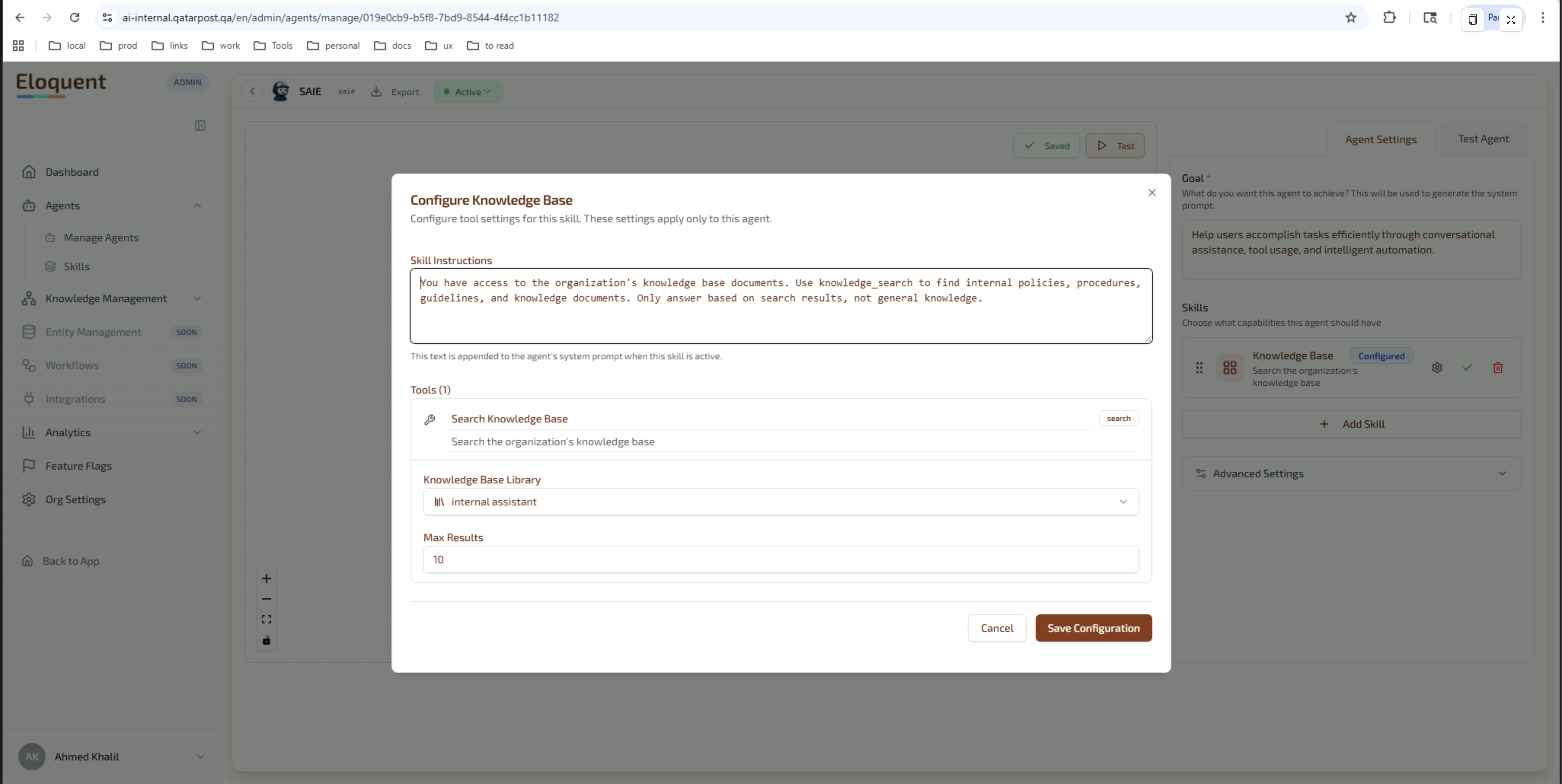
The agent’s capabilities are organised as Eloquent Skills, each tied to one of the service flows. Skills, their instructions, and their tools are configured per agent in the Agent Builder:
| Skill | Purpose | Tool name |
|---|---|---|
| Track Package | Look up tracking events. | open_package_tracking_flow |
| Send Package | Open the multi-step send wizard. | open_send_package_flow |
| Package Delivery | Hold / forward an in-transit shipment. | open_forwarding_flow |
| PO Box | Renew a PO Box subscription. | open_pobox_status_and_renewal_flow |
| Pricing | Run the price calculator. | (invoked transparently) |
| Store Locator | Open the branches map. | (knowledge-graph node attachment) |
| Knowledge Base | Answer general Qatar Post questions. | knowledge_search |
Adding a new skill is a configuration change in the Agent Builder — no website redeploy.
7.3 Client-Side Function Tools — the Agent → UI Bridge
The service-flow tools above are declared as client-side function tools. When the agent invokes such a tool, the widget intercepts the call, opens the matching side-car component, and passes the tool parameters as the initial state of the form. This is what makes it possible for the agent to say “Let me open the tracking form for you” and have a fully-populated form appear in the next frame — without any chat message containing form data.
7.4 Updating the Agent
Agents are managed from the Eloquent Admin Console — create, edit, version, and set status without writing code:
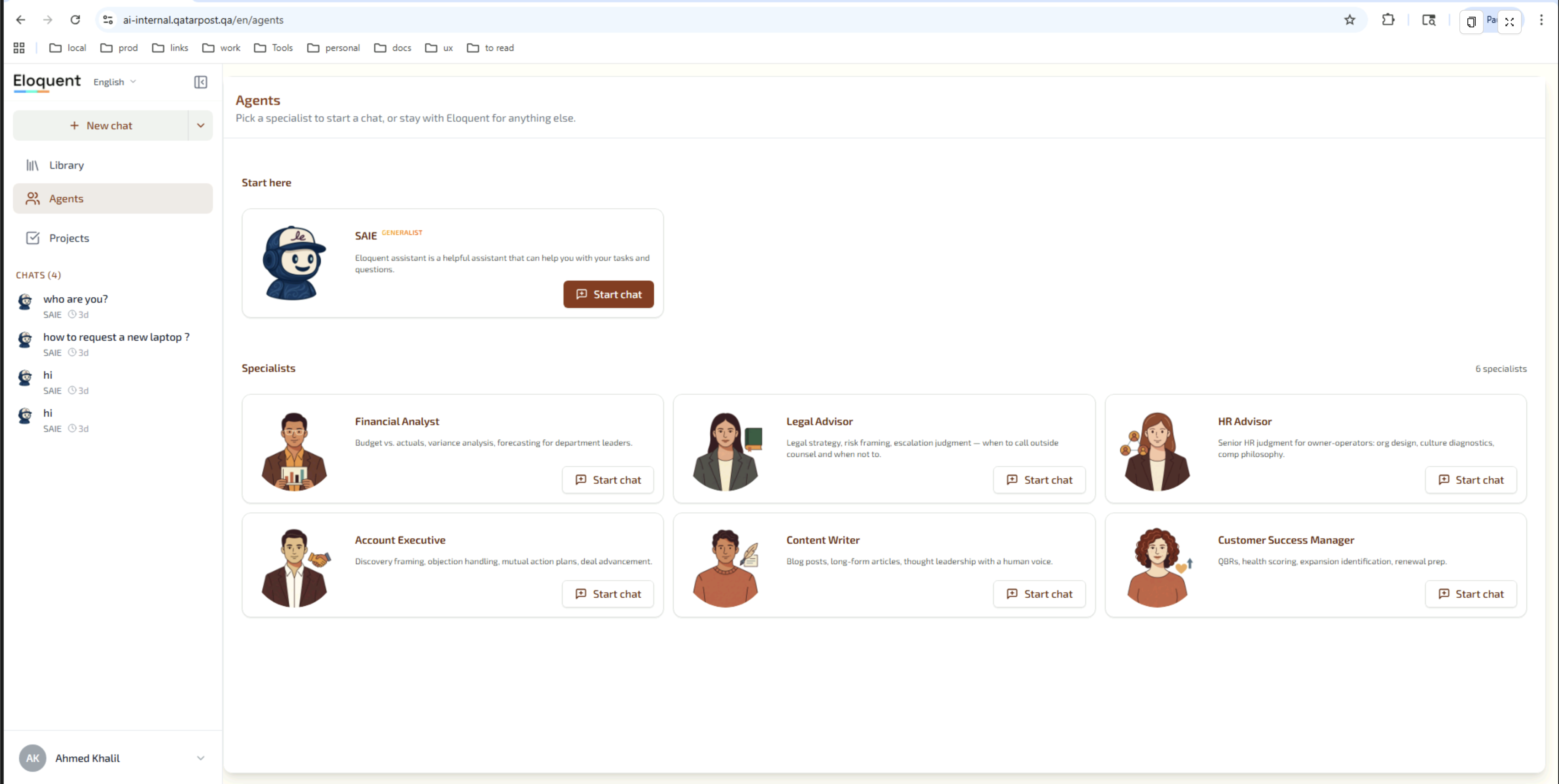
Qatar Post platform owners can change the agent’s behaviour without touching the website:
- Edit the agent’s goal, system prompt, or skill instructions in the Agent Builder.
- Add a new skill (e.g. file-a-complaint) and a matching client function — the widget is built to discover new tools at runtime and degrade gracefully if a tool has no side-car component yet (the custom client function fallback view renders the tool’s parameters as JSON for review).
- Adjust the model selection or response language guidance.
- Roll back via the agent’s version history.
8. Backend Integration
8.1 Eloquent Chat Service
The widget connects to the Eloquent chat service via HTTPS / Server-Sent Events at CHAT_SERVER_BASE_URL. The chat service handles streaming AI responses, tool-call orchestration, conversation persistence, and knowledge retrieval. It is reachable from the public internet and authenticated via the agent’s public credentials embedded in the widget bootstrap.
8.2 Qatar Post Public APIs
Two Qatar Post public APIs are called directly:
- Track & Trace —
POST /api/Tracking/track_and_trace. Used by the Track Parcel flow. No authentication; rate-limited by tracking number. - Pricing — used by the Price Calculator and inside Step 6 of Send a Package. Authenticated by the agent’s org and skill credentials.
8.3 Qatar Post Service APIs (OTP-gated)
These APIs change customer data and require an OTP reference token:
- Forward / Hold — search eligible packages, save a hold or forward.
- PO Box — lookup, update subscription, generate payment link.
- OTP — send and validate one-time codes.
Each call carries the agent’s org and skill credentials in headers plus the visitor’s mobile number and the single-use OTP token issued in §5.2.
8.4 Widget Messenger
When the widget is embedded as an iframe on the parent qatarpost.qa site, a postMessage bridge lets the host page open the widget programmatically, listen for events (chat opened, flow started, flow completed), and tear down the widget at the end of a user journey.
9. Non-Functional Requirements
9.1 Branding & Theming
The widget ships with a QPost-aligned default theme but the relevant values are exposed for tuning:
- Primary colour: configurable via the agent’s appearance settings.
- Typography: Exo_2 (primary, Arabic-capable) and IBM Plex Mono (code).
- Status colours: green for delivered, orange for in transit, red for failed, gray for pending. These are used consistently across the Track flow, the Send confirmation, and the PO Box status panel.
- Bidirectional layout: every component is built to render in both directions; no separate Arabic build.
- Avatar: a static image or a Rive animation. The repo includes a default robot avatar; Qatar Post can supply a branded variant.
9.2 Operations & Analytics
Conversation Log
Every conversation is persisted in the Eloquent Chat Log surface inside the Admin Console. QPost Service Operators can:
- Browse all chats with filters by date range, language, and visitor ID.
- Open a transcript with the full message history, tool calls, and tool results.
- See session metadata: start/end timestamps, duration, message count, agent, status, CSAT score if collected.
Tool-Call & Conversion Analytics
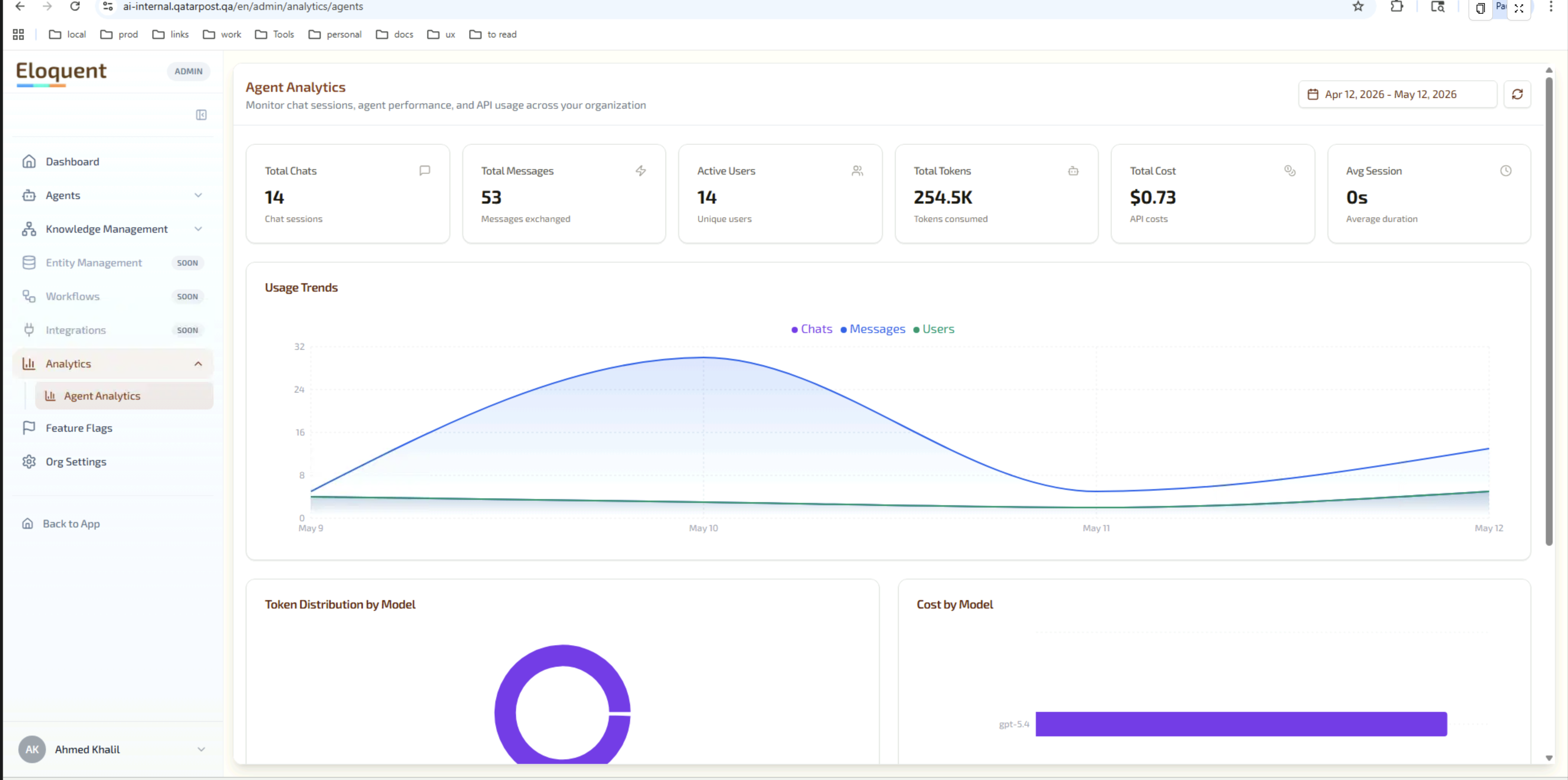
The Analytics dashboard aggregates conversation data with views relevant to a public-facing widget:
- Flow usage — how many times each service flow was opened (
open_package_tracking_flow,open_send_package_flow, etc.). - Conversion — how many opens resulted in a completed submission. Useful for spotting drop-off points (e.g. Send a Package opened 500 times, OTP entered 380, payment completed 220).
- Volume & engagement — chats, messages, active visitors, average session duration over time.
- Cost — token usage and model cost per period.
- Classification — breakdown of questions and intents.
- CSAT — satisfaction score and a word-cloud of free-text feedback if Qatar Post chooses to enable the in-chat survey.
Debug Mode
Service Operators can append ?debug=true to a widget URL to see, inline in the chat, every tool call the agent made and the JSON parameters and results. This is essential for diagnosing why a flow didn’t open or returned the wrong data, without needing access to logs.
9.3 Security & Compliance
- Anonymous-first: no user account is required. No credentials are stored.
- OTP-gated sensitive operations: any call that mutates a Qatar Post customer record requires a successful SMS OTP within the same session. OTP tokens are single-use.
- Single-use payment links: payment URLs are time-bound and bound to a specific shipment or subscription.
- Multi-tenant isolation: the widget runs in the Qatar Post Eloquent tenant — its own PostgreSQL schema, its own ClickHouse database, isolated from any other Eloquent customer.
- Data residency: the deployment can be pinned to a specific region. On-premise installation is available if regulatory requirements demand it.
- PII minimisation: the chat log stores the visitor ID, not raw identifiers. Mobile numbers are stored only for the duration of an active OTP token.
- Audit trail: every conversation and every tool call is logged for retrospective review.
10. Roadmap & Out-of-Scope
This section is intentionally left for Qatar Post to populate with their phased rollout plan and explicit out-of-scope items. Suggested headings:
- Phase 1 (Pilot): which qatarpost.qa pages embed the widget first; success criteria; volume targets.
- Phase 2 (General Availability): site-wide rollout, marketing campaign tie-in.
- Phase 3 (Optional): additional flows (file a complaint, change-of-address, returns, customs declaration), authenticated mode for logged-in QPost customers, in-app embedding.
- Explicit out-of-scope items for v1.0 (e.g. mobile-app native embedding, B2B/enterprise flows).
11. Glossary
| Term | Meaning |
|---|---|
| Widget | The chat bubble + window mounted on qatarpost.qa via a single <script> tag. |
| Side-car | A panel that opens beside the chat to render a structured flow (Send, Track, etc.). |
| Client-side function tool | A tool that, when called by the agent, triggers a UI action in the widget instead of running server-side. The bridge between the agent and the widget UI. |
| Service flow | One of the six structured wizards (Track, Send, Hold/Forward, PO Box, Pricing, Locator). |
| Visitor ID | An anonymous identifier auto-generated for each unbranded chat session. |
| OTP | One-time password delivered by SMS; used to gate sensitive operations without requiring login. |
| Skill | An Eloquent capability attached to the agent; each skill has its own instructions and tools. |
| Tool | A specific action inside a skill — calls a backend API or opens a side-car. |
| AI Brain | The retrieval-transparency panel; hidden by default, exposed under ?debug=true. |
| Widget messenger | A postMessage bridge that lets the parent page communicate with the widget when it is embedded as an iframe. |
| Library | A named collection of ingested documents in Eloquent; backs the agent’s Knowledge Base skill. |
| CSAT | Customer Satisfaction score, captured by an optional in-chat survey. |