Qatar Post Internal AI Assistant
Solution & Requirements Document
Version 1.1 — May 12, 2026
Prepared by Eloquent for Qatar Post
1. Executive Summary
This document specifies the Internal AI Assistant solution for Qatar Post employees, built on the Eloquent platform. The assistant enables employees to ask natural-language questions about Qatar Post’s HR, IT, Finance, and operational policies in Arabic or English; receive answers grounded in the actual policy documents with inline citations; attach files for in-context analysis; and complete service-desk transactions — such as opening an IT ticket — directly from the conversation.
Compared with the v1.0 scope captured in May 2025, the Eloquent platform has matured significantly. v1.1 of this document reflects current capabilities including:
- A full Agent Builder that lets Qatar Post administrators create role-specific assistants — HR Helper, IT Support, Finance Q&A — each with its own knowledge sources, skills, and tools, without writing code.
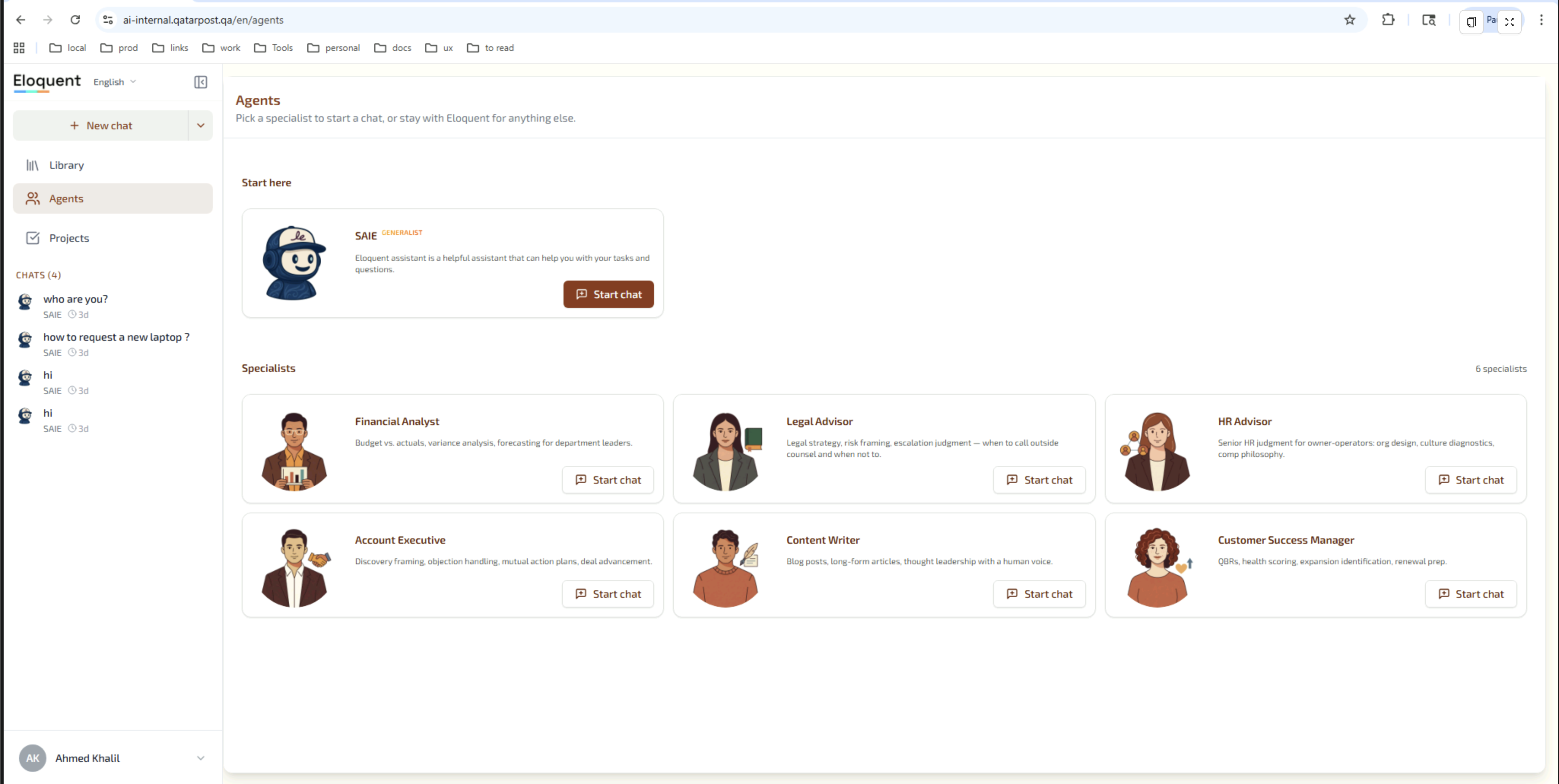
- A pre-built library of specialist agents (Financial Analyst, Legal Advisor, HR Advisor, Account Executive, Content Writer, Customer Success Manager) that Qatar Post can adopt out-of-the-box or use as templates for tailored personas.
- Document-grounded citations that open the source PDF, Word, or PowerPoint file inline with the cited region highlighted on the correct page.
- An AI Brain panel that shows employees exactly which knowledge-base searches the agent ran while preparing each answer — full transparency, not a black box.
- A Library of shared knowledge with nested folders, organised per business area (HR, Finance, Legal, IT, etc.).
- A consolidated Analytics Dashboard with chat volume, active users, token consumption, model cost, usage trends, and per-model breakdowns.
- A Projects & Tasks workspace with Kanban-style task tracking (To-Do / In Progress / Review / Done / Blocked) — useful for service-desk follow-up workflows.
- Multi-tenant isolation with per-organisation database schemas and JWT-secured API access.
The remainder of this document is organised as a solution specification: each functional area describes what the user sees, the relevant admin controls, and the supporting capability on the Eloquent platform.
2. Solution Overview
The Qatar Post Internal AI Assistant runs on the Eloquent platform, a multi-tenant system designed for enterprise AI assistants grounded in organisational documents. It operates across three personas:
| Persona | Description | Primary Surface |
|---|---|---|
| Employee | Any Qatar Post staff member. Asks policy questions, attaches documents for advice, opens IT/HR tickets. | Chat interface (web). |
| Department Admin | Department lead (IT, HR, Facilities) responsible for ticket triage and knowledge curation in their area. | Library + Service Desk admin tabs. |
| Platform Admin | Qatar Post IT/Information Management role. Owns agents, knowledge sources, users, and analytics. | Eloquent Admin Console (full). |
3. End-User Experience
3.1 Conversational Q&A
The assistant answers employee questions about Qatar Post policies and regulations — HR Policy, IT Policy, Finance Manual, Information Security Framework, Acceptable Use Policy, and any other documents Qatar Post chooses to ingest.
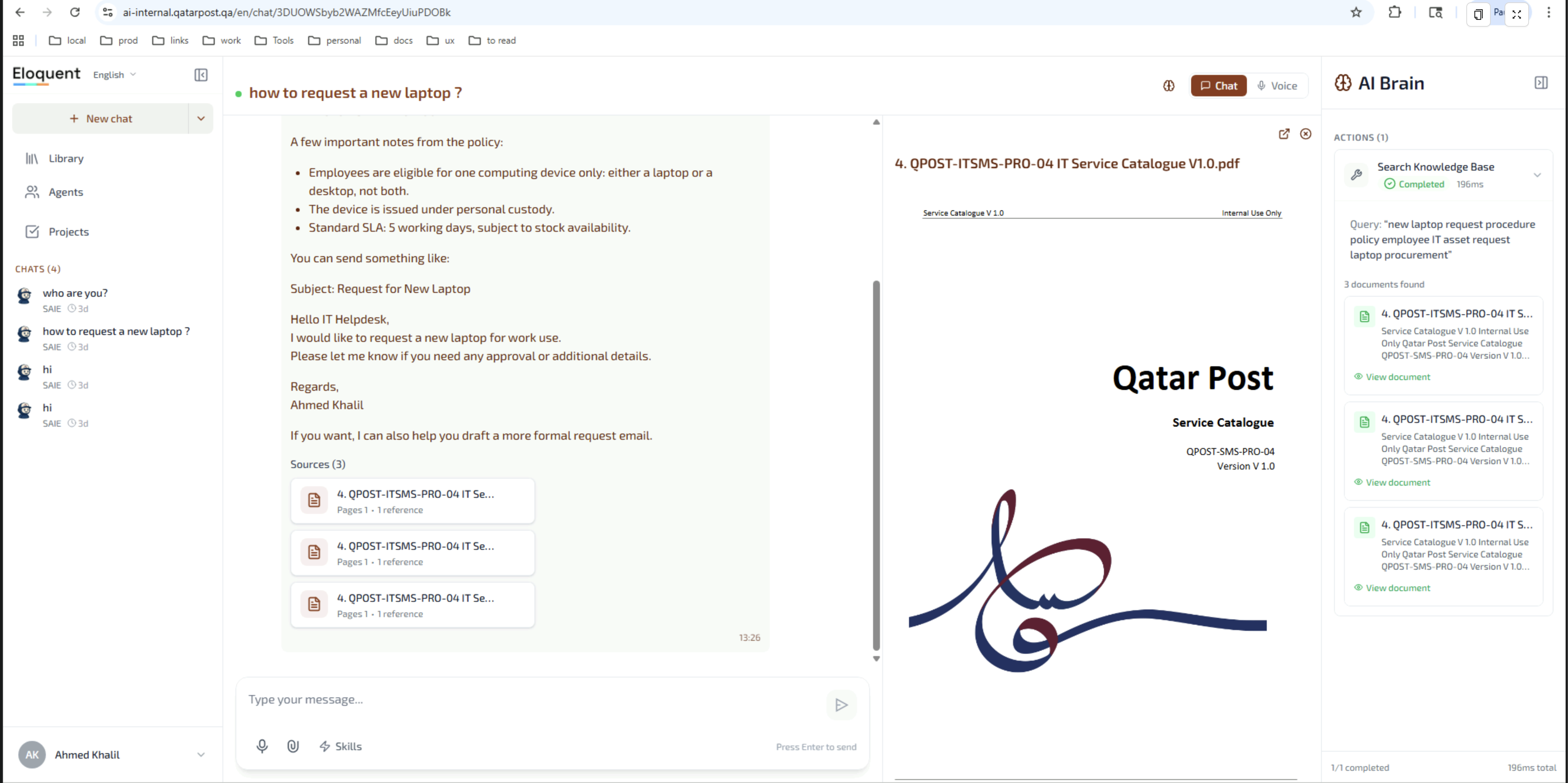
Features visible in the screenshot:
- Streaming answers: text appears word-by-word.
- Multi-turn: full conversational context preserved within a chat session.
- Bilingual: Arabic and English supported in the same conversation, including mixed-language input.
- Persistent history: the left sidebar lists prior chats; users can return to any of them.
- Source chips below the answer: each answer carries a strip of source-document references; clicking a chip opens the document.
- Inline source viewer: the cited PDF opens beside the conversation in a read-only viewer — no download needed.
- AI Brain panel (right): shows which knowledge-base searches the agent ran in real time. See §3.7.
3.2 Document-Grounded Citations
Every answer that uses an internal source includes inline citations. Clicking a citation opens the source viewer beside the conversation, with the cited region highlighted on the correct page.
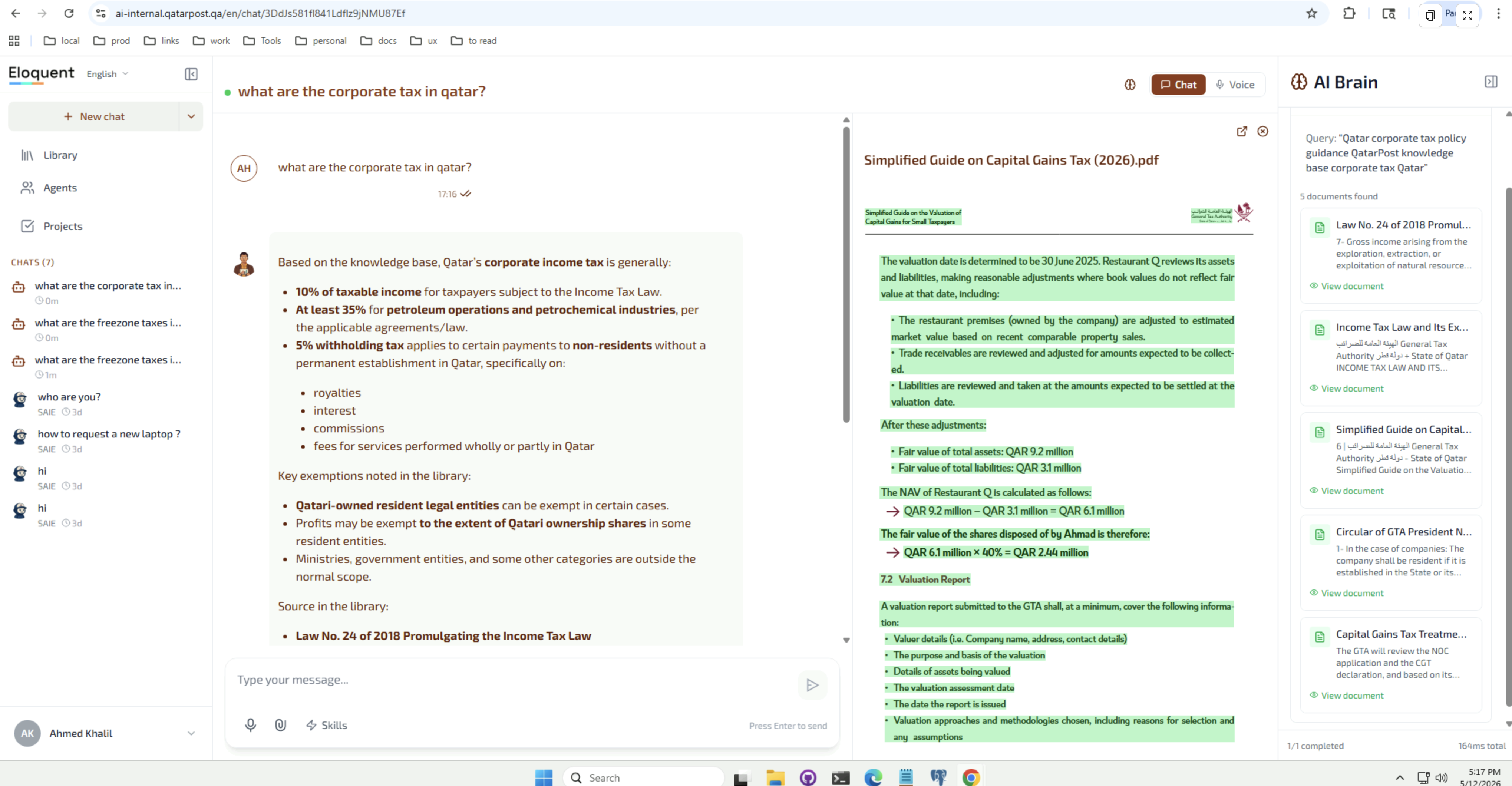
Supported behaviours:
- PDF citations: render the original PDF with passage-level highlights on the cited page. Multiple page references are listed (e.g. pp. 1–3, 5, 7–9).
- Word and PowerPoint: rendered inline using an embedded Office viewer in read-only mode.
- Markdown / web articles: rendered with the original URL available to open in a new tab.
- Source cards: each answer displays a strip of source-document chips below the message; each chip shows file icon, title, page ranges, and reference count.
- Verifiable: an employee can always click through to the exact passage the assistant used — no opaque answers.
“Cites authoritative sources. Answers grounded in publications from the same authorities your auditors, lawyers, and HR managers cite every day.”
3.3 File Attachments in Chat
Employees can attach files directly to a message to get answers about their specific situation. Supported attachment classes:
- Documents (PDF, DOCX, PPTX) — analysed and referenced like any internal source for the duration of the chat.
- Spreadsheets (XLSX, CSV) — read row-by-row; the assistant can answer questions about the data and compute simple aggregations.
- Data files — generic structured-data uploads.
Attachments appear as removable chips below the input. The assistant indicates when a file has finished analysis so the user knows when they can ask follow-up questions about it.
3.4 Voice Mode
Employees can switch the chat into Voice mode to speak rather than type. Voice mode uses the browser’s Web Speech API with both Arabic and English recognition. Recognised speech is streamed into the conversation as the user speaks.
3.5 Chat History & Resumption
A left sidebar lists the user’s recent chats, paginated 15 at a time with on-demand “Load more”. Clicking a chat re-opens the full transcript so the user can resume where they left off. The current chat title auto-updates from the first user message.
3.6 In-line Helpdesk Ticket Creation
When an employee describes a problem that the assistant cannot resolve through Q&A — for example “my VPN is not connecting” — the assistant offers to open a Helpdesk ticket on the employee’s behalf. The assistant:
- Asks a small number of clarifying questions configured for the relevant department.
- Confirms a summary with the user.
- Calls the configured ticketing tool (the built-in Service Desk, Jira, ServiceNow, or a custom webhook to Qatar Post’s existing ticketing system).
- Returns the ticket reference number in-chat so the employee has immediate confirmation.
The same flow supports HR requests, facilities issues, and any other department a Platform Admin chooses to enable.
3.7 AI Brain — Retrieval Transparency Panel
Every chat surface includes an AI Brain panel to the right of the conversation. As the agent prepares each answer, the panel streams a live view of the actions the agent took:
- Which knowledge-base searches it ran (and the queries).
- Which documents came back from each search.
- Which tools it called and with what arguments.
- Any intermediate reasoning steps the agent chose to surface.
This turns the assistant from a black box into an auditable workflow. An employee — or an internal auditor reviewing a transcript — can always see exactly where each fact in an answer came from. For Qatar Post this materially raises trust and lowers the bar for adopting AI in regulated areas.
4. Agent Builder
The Agent Builder is the central administrative surface for defining what the assistant is, what it knows, and what it can do. Qatar Post Platform Admins can create one general-purpose assistant or several role-specific ones (for example: IT Helper, HR Q&A, Finance Reference).
4.1 Agent Management & Specialist Library
Eloquent ships with a library of pre-built specialist agents. Qatar Post can adopt them as-is, clone them as starting points, or build new agents from scratch.
For the Qatar Post rollout, the catalogue will typically include:
- SAIE (Generalist) — entry point for any employee question; routes to specialists when needed.
- HR Helper — Qatar Post HR policy, leave, salary increase requests, EOSB.
- IT Helper — Qatar Post IT policy, service catalogue, ticket creation.
- Finance Reference — Finance Manual, expense procedures, audit trail.
- InfoSec Advisor — Information Security Framework, Acceptable Use Policy, Information Classification.
Agent Management capabilities:
- List view: card-style listing of all agents in the tenant with status and last-modified information.
- Create new: launches the Agent Builder with sensible defaults.
- Import / Export: full agent configuration is portable as a JSON document — useful for promoting from staging to production or for backups.
- Versioning: each agent carries a semantic version label so admins can track changes to instructions and configuration over time.
4.2 Designing an Agent
The builder exposes the following per-agent fields:
| Field | Purpose |
|---|---|
| Name | Display name shown to employees. |
| Avatar | Uploaded image or AI-generated SVG avatar. |
| Goal | A one-paragraph description of the agent’s job. Used to auto-generate the system prompt. |
| System prompt | The full instruction set sent to the model. Auto-generated from the Goal, fully editable. |
| Skills | The capabilities attached to this agent (see §4.3). |
| Model | Selection from the available foundation models. |
The builder uses a visual layout so admins can see the agent, its skills, and the tools inside each skill as a single diagram rather than a long form.
4.3 Skills & Tools
Eloquent uses a two-level model:
- A Skill is a coherent capability — for example Knowledge Base, Open IT Ticket, HR Request, Document Drafting.
- Each skill has its own skill instructions (a system-prompt fragment that activates when the skill is in use) and a small set of Tools the agent may invoke while the skill is active.
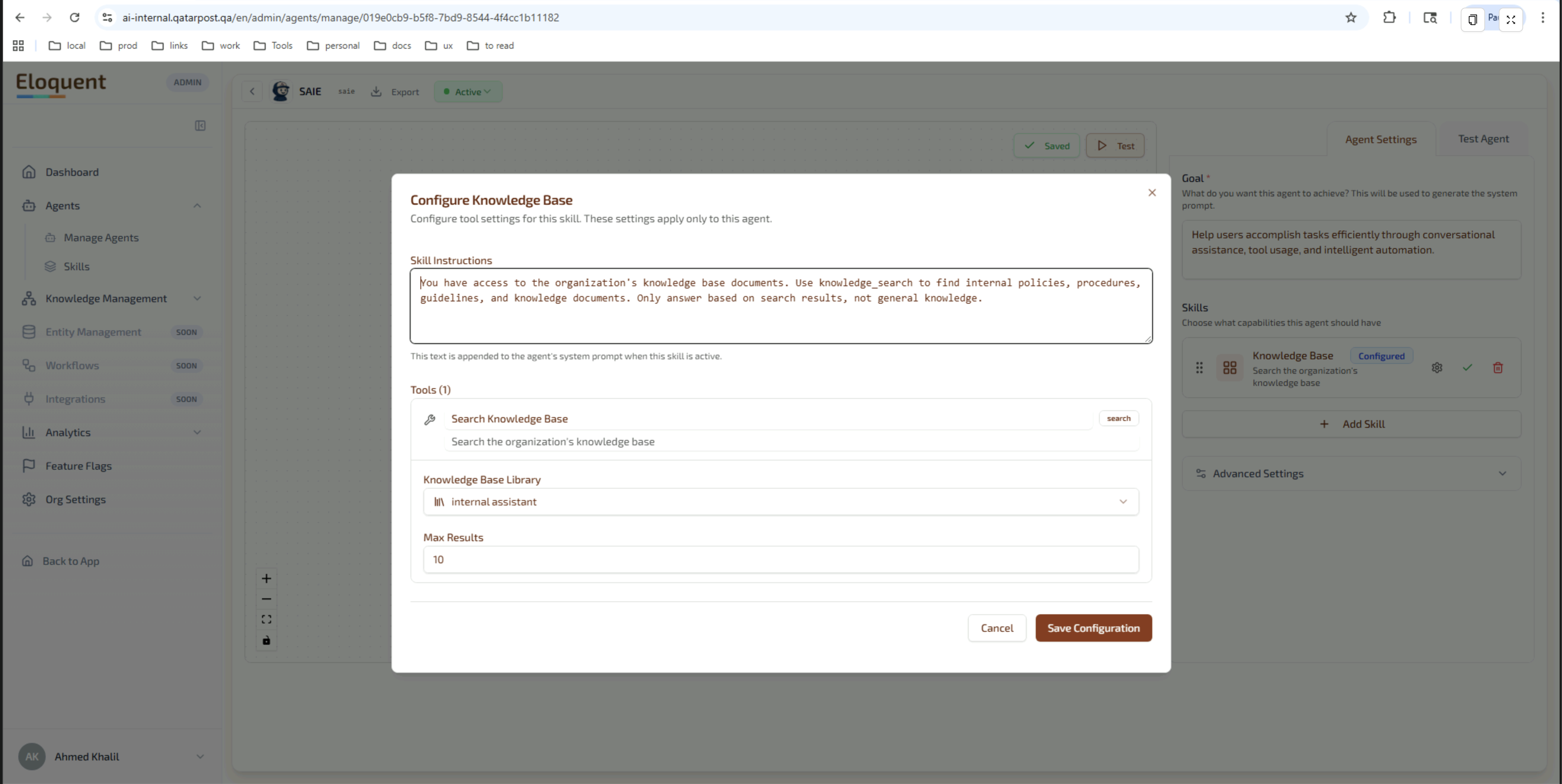
The configuration shown in the screenshot is the recommended starting point for the Qatar Post generalist: a Knowledge Base skill bound to the internal-assistant library, with explicit instructions forcing the agent to ground every answer in retrieved content rather than its general training data.
Additional skill types relevant to Qatar Post:
- Open IT Ticket — calls into the Service Desk or an external ITSM system (see §4.4).
- Open HR Request — same pattern, routed to HR.
- Document Drafting — drafts memos, emails, request templates inline.
- Custom skill — defined by admins for QP-specific workflows.
4.4 Helpdesk / ITSM Integration
Helpdesk ticketing is delivered as a Skill whose tools call out to the configured backend system. Four backends are supported out of the box:
- Eloquent Service Desk (built in) — tickets are routed to department-scoped administrators within the platform.
- Jira Service Management — via API tool with credentials configured in the admin console.
- ServiceNow — via API tool.
- Custom / in-house — via Webhook tool to any internal endpoint Qatar Post exposes.
This flexibility means the assistant can integrate with whatever ticketing system Qatar Post already operates without changing the chat experience for the employee.
4.5 Embeddable Chat Widget
Any agent can be deployed as a chat widget that drops into an existing internal portal with a single script tag. The Embed Customiser exposes four tabs:
| Tab | Controls |
|---|---|
| Appearance | Primary/secondary colours, button style, position, fonts, dark/light mode. |
| Behaviour | Auto-open on page load, persistence across navigation, retry behaviour, default greeting. |
| Security | Allowed-domain whitelist, CORS origins, JWT-based identity passthrough so the widget knows the logged-in user. |
| Embed Code | Auto-generated <script> snippet ready to paste into the host page. |
A live preview panel shows the widget as the admin tunes it.
5. Knowledge & Library Management
Qatar Post Platform Admins are responsible for keeping the assistant’s knowledge base current. Ingestion is fully self-service.
5.1 Document Ingestion Pipeline
Admins drag-and-drop one or many files into a library. Each file becomes an ingestion job tracked through five states:
Pending → Processing → Completed, with branches to Failed (with diagnostic message) and Cancelled.
The pipeline performs automatically:
- Format normalisation — DOCX, PDF, PPTX, XLSX, MD, TXT, HTML.
- Chunking — documents are split into semantically meaningful chunks for retrieval.
- Embedding — each chunk is converted to a vector representation for similarity search at query time.
- Indexing — chunks become available to agents within minutes of ingestion completing.
Each job shows total files, total size, chunk count, and timing information so admins can confirm coverage.
5.2 Knowledge Management
The Knowledge Management section of the Admin Console is the home for all things document-related: libraries, individual documents, ingestion jobs, and the underlying knowledge graph that supports relationship-aware retrieval.
Capabilities:
- Multiple knowledge bases per organisation — e.g. HR Policy, IT Policy, Finance Manuals — assigned to specific agents.
- Schema designer — define node and edge types for richer, graph-based retrieval where simple flat search is not enough.
- Explorer — visualise what the assistant can see, run queries, and audit coverage.
- Automated ingestion — schedule recurring bulk ingestion (e.g. a folder synced from SharePoint).
- Website ingestion — crawl an internal portal with depth and same-domain controls.
5.3 Bulk & Website Ingestion
Where policies are published on Qatar Post’s internal web portal, the Website ingestion flow can crawl a set of URLs and ingest the pages into a library. Bulk ingestion supports folder-level batch processing for one-shot migrations from a SharePoint share or a network drive.
5.4 Library
The Library is the day-to-day surface for organising ingested documents. It groups them into named, shareable collections — each agent can be assigned one or more libraries, so an HR agent only sees HR libraries while an IT agent only sees IT libraries.
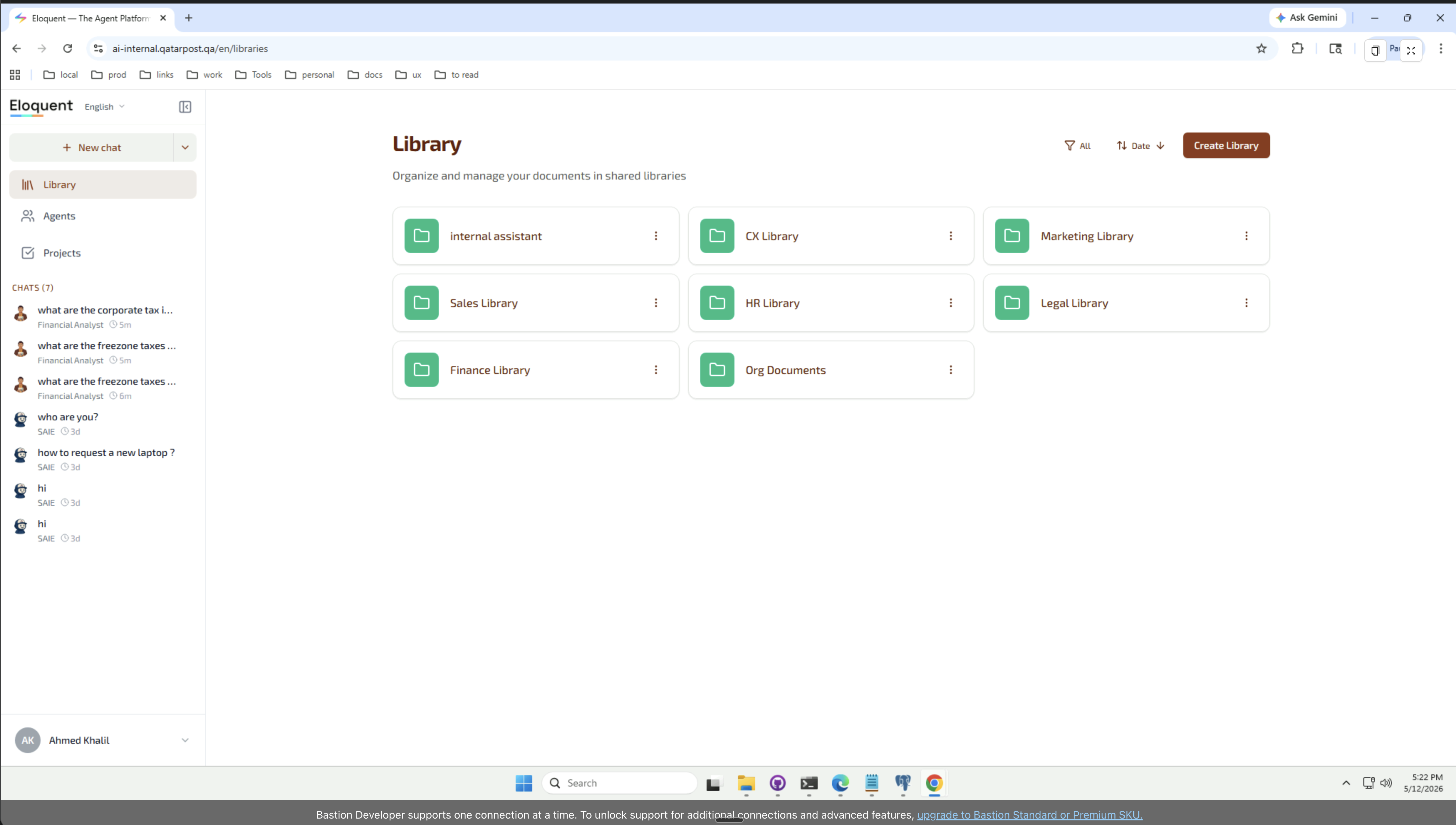
Within a library, documents can be organised into nested folders so large policy sets stay navigable.
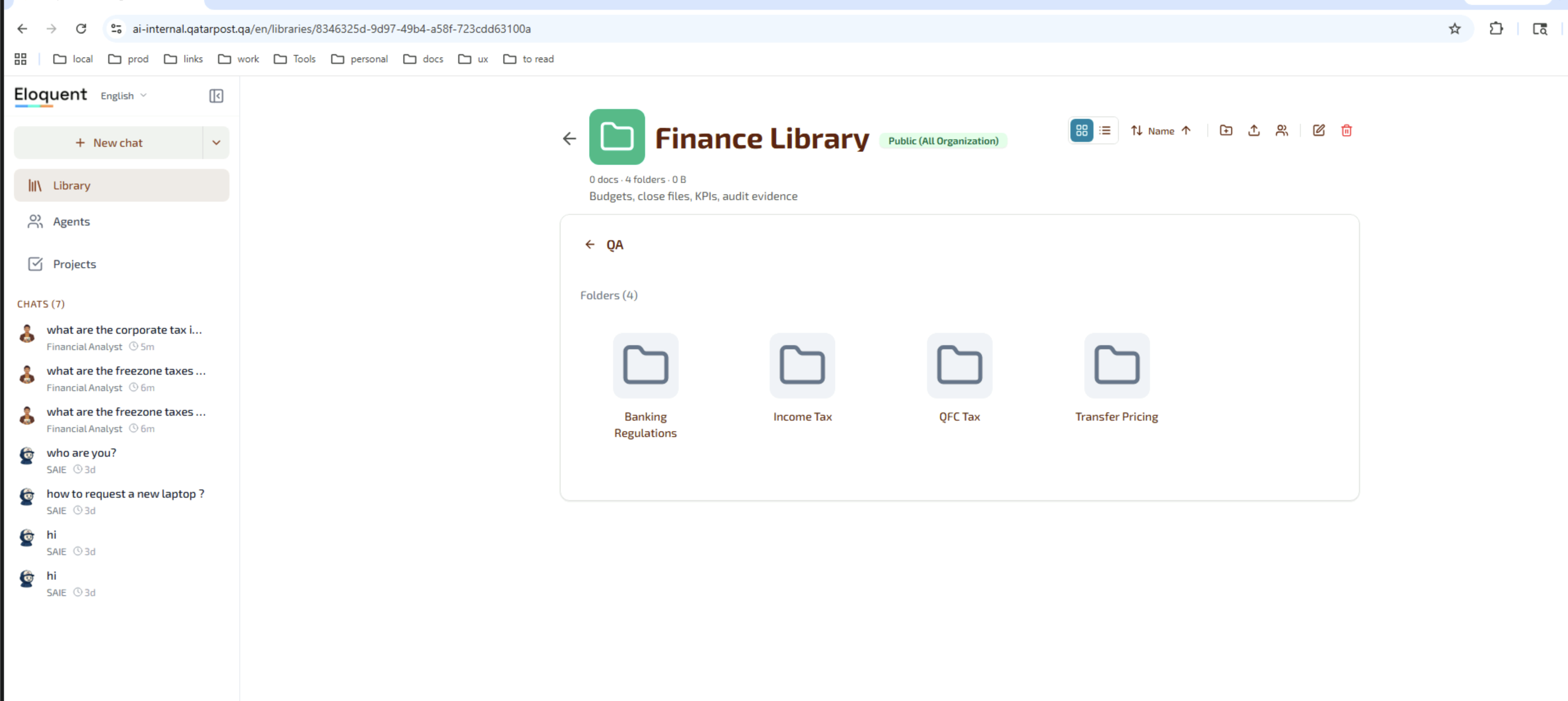
Library features:
- Create / rename / delete libraries from the landing page.
- Visibility scope — Public (All Organization) or restricted to specific roles.
- Nested folder hierarchy with breadcrumb navigation.
- Document operations — upload, preview, replace (versioning), download, delete.
- Assign to agents — a single library can be shared across several agents (e.g. HR and Finance both reference Org Documents).
- Seed libraries — Eloquent ships sample libraries that can be cloned and adapted, accelerating initial rollout.
6. Admin Dashboards
6.1 Chat Log Dashboard
Platform Admins can browse every conversation between employees and the assistant. The Chat Log lists chats with metadata and provides a transcript view for detail.
Columns and controls:
- Chat ID — internal reference.
- User — Qatar Post email address.
- Agent — which agent handled the conversation.
- Category (classification) — HR, IT, Facilities, Policy, Document, General.
- Start time / End time — full timestamp.
- Duration — wall-clock chat length.
- Messages — message count.
- Status — completed / active / ended / archived.
- CSAT score — captured from the in-chat satisfaction prompt.
Filters: date range, agent selector, user email, free-text search by chat ID. Clicking a row opens the Chat Details drawer with the full transcript and the session metadata above.
6.2 Analytics Dashboard
The Analytics page aggregates conversation data across agents and time ranges.
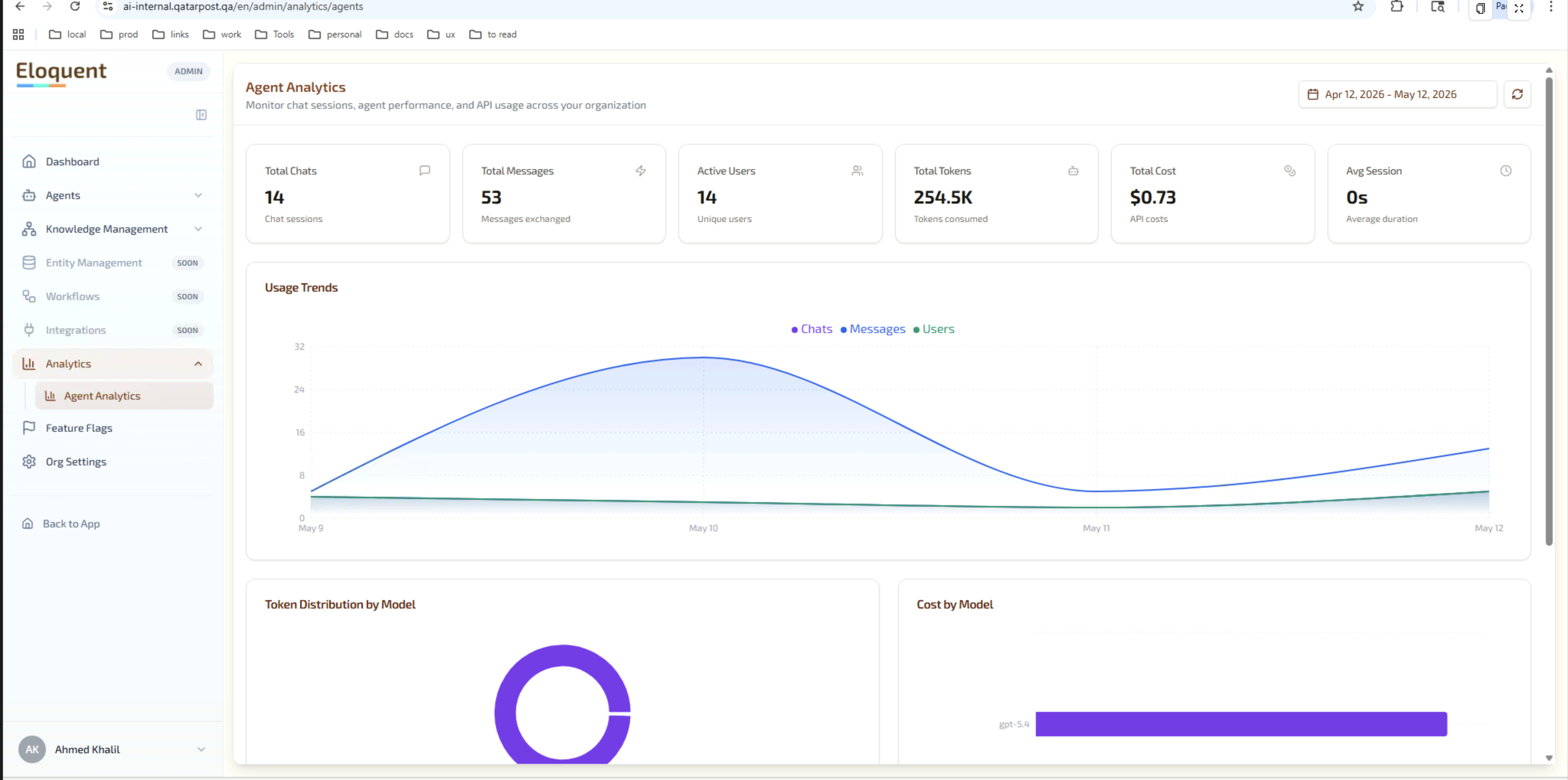
Available views:
| Metric class | Specific measures |
|---|---|
| Volume | Total chats, total messages, active users. |
| Engagement | Average session duration, usage trends over time. |
| Cost | Total tokens consumed, total API cost (USD), per-model breakdown. |
| Model mix | Token distribution by model, cost by model — useful for cost optimisation. |
| Classification | Breakdown of chats by category (HR, IT, Facilities, Policy, Document, General). |
| Outcomes | Tickets created, documents generated, task-completion rate. |
| Tool usage | Frequency each agent tool was invoked. |
| CSAT | Average satisfaction score, response count, word-cloud of free-text feedback. |
| Answered vs Unanswered | Derived from classification + outcome data — surfaces topics where the assistant fell back to “I don’t know”. |
Filters: date range, agent selector. Data refreshes on demand.
6.3 Service Desk Admin
The Service Desk surface lets Qatar Post manage how tickets opened by the assistant are routed and structured. Two tabs:
Admin Accounts
- Define administrators per department (IT, HR, Facilities, or any Custom department such as Procurement or Legal).
- Each department gets a colour code (IT blue, HR emerald, Facilities amber, Custom purple) for quick visual scanning.
- Actions: create, update, revoke permissions, delete.
Field Managers
- Define which custom fields appear on a ticket created in each department. For example IT tickets might require Asset ID and Severity, while HR tickets require Subject Type and Confidentiality.
- Fields can be required or optional, text/select/date.
- The assistant uses these field definitions at runtime to ask the employee the right clarifying questions before submitting the ticket.
6.4 Team & Role Management
Found under Organisation Settings → Team. Functions:
- Invite team members by email.
- Assign role: Admin (full access to Admin Console) or User (chat only).
- Resend or revoke pending invitations.
- Update an existing member’s role.
- Remove a member.
Combined with the Service Desk admin tab, this gives Qatar Post complete control over who can access the Admin Console and what they see inside it.
7. Projects & Tasks Workspace
Beyond chat and tickets, Eloquent provides a lightweight Projects surface where the assistant — or an employee — can capture follow-up work. This is useful for service-desk workflows where a ticket is only the first step of a multi-stage task.
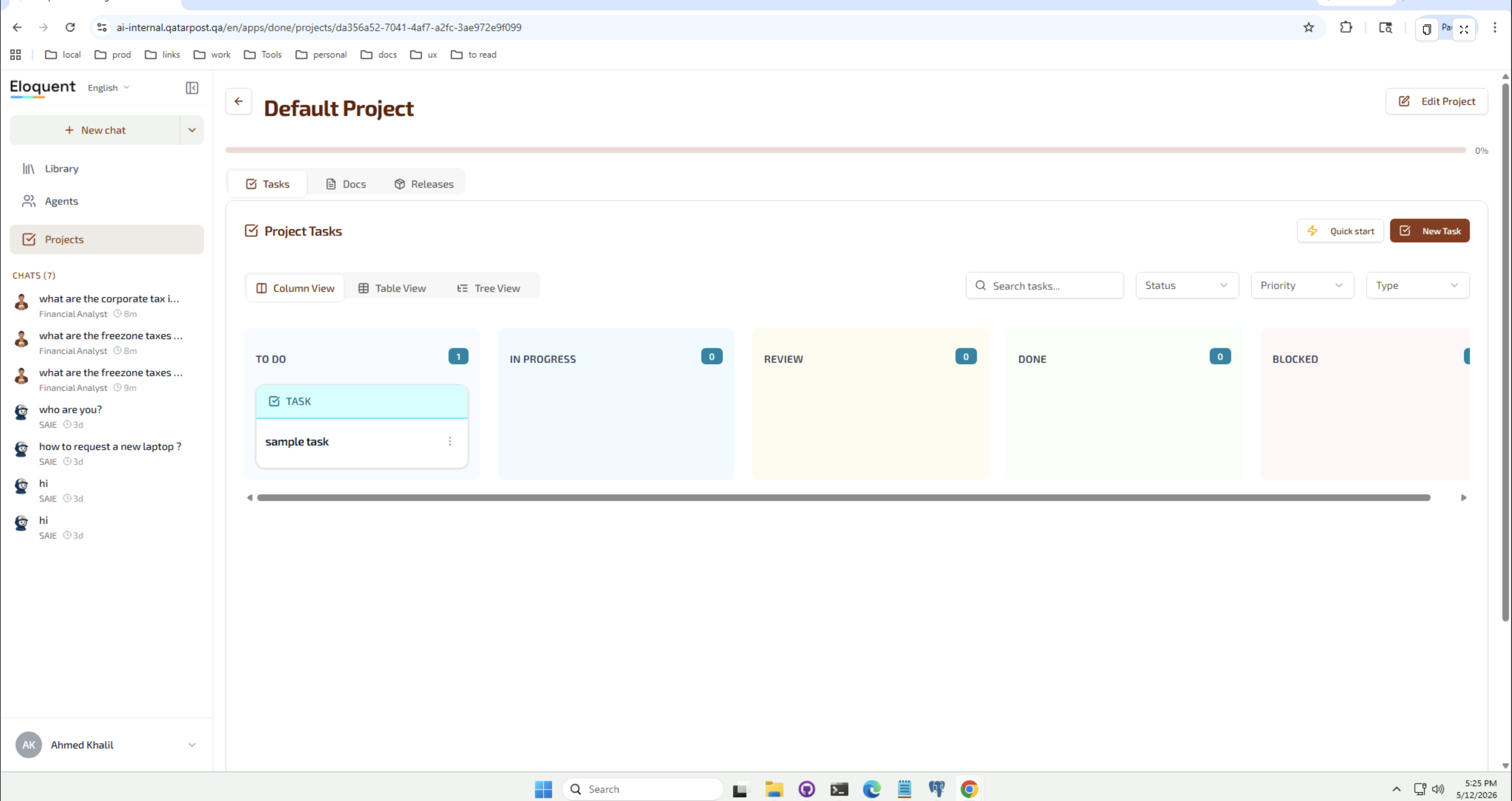
Highlights:
- Tasks — Kanban or table view; status flow To Do → In Progress → Review → Done with a Blocked sideline.
- Docs — collaborative documents attached to a project.
- Releases — group tasks into release milestones for larger initiatives.
- Views — Column (Kanban), Table, and Tree views over the same task data.
- Filters — by Status, Priority, Type, and free-text search.
- Created from chat — the assistant can open a task from a conversation (e.g. “Track my laptop request to completion”), giving Qatar Post a single audit trail per request.
8. Non-Functional Requirements — Multi-Tenancy, Security & Compliance
The Eloquent platform is built for organisations that cannot tolerate data co-mingling.
- Per-organisation isolation: each tenant — Qatar Post is one tenant — has its own PostgreSQL schema (
org_<uuid>) and its own ClickHouse database. There is no shared table where rows from multiple tenants live side-by-side. - JWT authentication: every API call carries a signed token. The API Gateway validates the token, extracts
orgIdanduserId, and forwards them to backend services as headers. Backend services use those headers, not anything in the request body, to scope queries. - No direct backend exposure: the only externally reachable component is the API Gateway. NATS, internal services, and databases live on a private network.
- Audit trail: every conversation is persisted in the Chat Log, giving Qatar Post a complete record of what the assistant told whom and when.
- Right-to-erasure: a user’s chats can be archived or deleted on request; tenant-wide export is supported for compliance reviews.
- Data residency: deployments can be pinned to a specific region; on-premise and air-gapped installations are available.
9. Mapping: v1.0 Requirements → v1.1 Solution
The table below shows how each requirement captured in the May 2025 document is satisfied — or extended — in the current Eloquent platform.
| v1.0 Section | v1.0 Requirement (summary) | v1.1 Solution Section | Status |
|---|---|---|---|
| 2.1 | Assistant Q/A — answer employee questions from policy documents. | §3.1 Conversational Q&A | Delivered, extended with streaming, bilingual support, and the AI Brain transparency panel. |
| 2.2 | Document Citation — direct reference to source documents. | §3.2 Document-Grounded Citations | Delivered, extended with inline PDF/Office viewers and passage-level highlights. |
| 2.3 | Chat Log Dashboard — admin views transcripts & metadata. | §6.1 Chat Log Dashboard | Delivered, columns and filters refreshed. |
| 2.4 | Helpdesk Integration — assistant opens tickets. | §3.6 + §4.4 + §6.3 | Delivered, extended with multiple ITSM connectors and the built-in Service Desk. |
| 2.6 | Analytics Dashboard — most-asked topics, answered vs unanswered, user feedback (CSAT). | §6.2 Analytics Dashboard | Delivered, extended with classification, tool usage, token cost, per-model spend, and word-cloud CSAT. |
| 2.7 | Document Ingestion — admins upload new documents. | §5.1 + §5.2 + §5.3 + §5.4 | Delivered, extended with the Library (nested folders, per-agent assignment), Knowledge Management, website crawl, and automated batch ingestion. |
| — | (Not in v1.0) Agent Builder, multi-agent configuration. | §4 Agent Builder | New capability added since v1.0. |
| — | (Not in v1.0) Specialist agent library. | §4.1 | New capability. |
| — | (Not in v1.0) AI Brain retrieval transparency panel. | §3.7 | New capability. |
| — | (Not in v1.0) Voice mode (Arabic / English). | §3.4 Voice Mode | New capability. |
| — | (Not in v1.0) Embeddable widget. | §4.5 Embeddable Chat Widget | New capability. |
| — | (Not in v1.0) File attachments in chat. | §3.3 File Attachments | New capability. |
| — | (Not in v1.0) Service Desk admin (department-scoped admins, custom fields). | §6.3 Service Desk Admin | New capability. |
| — | (Not in v1.0) Team & role management. | §6.4 Team & Role Management | New capability. |
| — | (Not in v1.0) Projects & Tasks workspace. | §7 Projects & Tasks Workspace | New capability. |
10. Roadmap & Out-of-Scope
This section is intentionally left for Qatar Post to populate with their phased rollout plan and explicit out-of-scope items. Suggested headings:
- Phase 1 (Pilot): scope, departments, success criteria.
- Phase 2 (General Availability): expansion plan.
- Phase 3 (Optional): additional connectors, language expansion, mobile app.
- Explicit out-of-scope items.
11. Glossary
| Term | Meaning |
|---|---|
| Agent | A configured assistant persona inside Eloquent — has a goal, system prompt, skills, and knowledge sources. |
| Skill | A coherent capability attached to an agent (e.g. Knowledge Base, Open IT Ticket). Each skill has its own instructions and tools. |
| Tool | A specific action the agent can take inside a skill (lookup, ticket creation, API call). |
| AI Brain | The right-hand panel in the chat UI that streams the agent’s retrieval steps and tool calls in real time. |
| Library | A named, shareable collection of ingested documents. Agents are assigned one or more libraries. |
| Ingestion | The process of loading documents into the assistant’s knowledge base. |
| Embedding | A vector representation of a chunk of text used for similarity search. |
| Knowledge Management | The admin section that owns libraries, documents, ingestion jobs, and graph schema. |
| CSAT | Customer Satisfaction score, captured by an in-chat survey. |
| Tenant / Organisation | An isolated Eloquent customer environment. Qatar Post is one tenant. |
| Service Desk | Eloquent’s built-in ticketing surface with department-scoped admins. |
| Embed widget | A chat widget that can be dropped into an existing internal web page via a <script> tag. |
| Project | A Kanban-style workspace for follow-up tasks, optionally created from chat. |