Qatar Post Branch Assistant
Solution & Requirements Document
Version 1.0 — May 12, 2026
Prepared by Eloquent for Qatar Post

1. Executive Summary
This document specifies the Qatar Post Branch Assistant — an animated, voice-driven AI character deployed on touchscreen kiosks inside Qatar Post branches. The Branch Assistant acts as a friendly first point of contact for visitors, handling the most common branch enquiries and self-service tasks before a customer ever needs to queue for a counter agent.
The assistant is presented as a Qatar Post-branded mascot: a cheerful uniformed character holding an envelope, animated with Rive vector graphics and synchronised with text-to-speech audio. Customers walk up to the kiosk, speak in Arabic or English, and the assistant answers, performs the requested action, or hands them off to a human agent when needed.

Architecturally the Branch Assistant is the third surface of the same Eloquent agent platform that powers the Internal AI Assistant and the public Website Assistant. The same chat engine, knowledge libraries, OTP service, and service-flow tooling are reused; only the front-end shell — a full-screen, voice-first, kiosk-tuned UI built around an animated avatar — is new.
Key characteristics:
- Voice-first interaction. Customers speak; the assistant speaks back. The keyboard is a fallback, not the primary input.
- Animated mascot. A Rive-animated avatar with idle, listening, and speaking states. Designed in two variants: a head-only badge for compact placements, and a full-body uniformed character for the hero state on the kiosk landing screen.
- Bilingual Arabic / English with auto-detected language per utterance and full RTL layout.
- Six self-service flows reused from the Website Assistant (Track, Send, Hold/Forward, PO Box, Pricing, Branch services), plus branch-specific additions (queue ticket, counter handoff).
- Privacy-aware for public spaces: PIN / OTP entry is shielded; sensitive screens auto-blank on inactivity.
- Operated by branch staff through the same Eloquent Admin Console used elsewhere — one tenant, one analytics dashboard.
The remainder of this document is organised as a solution specification: each section describes what the customer sees, the supporting capability on the Eloquent platform, and the branch-specific hardware and operational requirements.
2. Solution Overview
The Branch Assistant runs on the Eloquent platform inside the same tenant that powers the other Qatar Post AI surfaces. It uses a dedicated agent configured for in-branch, voice-first interaction. Four personas are involved:
| Persona | Description | Primary Surface |
|---|---|---|
| Branch Visitor | Any customer entering a Qatar Post branch — Qatar Post account holder or first-time visitor. Anonymous by default. | Kiosk touchscreen. |
| Counter Agent | A Qatar Post branch staff member at a service counter. Receives handoffs from the kiosk when a task exceeds self-service. | Counter terminal (out of scope for this widget; integration point only). |
| Branch Manager | A Qatar Post branch lead who monitors kiosk usage, queue length, and visitor sentiment. | Eloquent Admin Console — branch-scoped Analytics. |
| Eloquent Admin | A Qatar Post platform owner with rights to edit the agent’s skills, prompts, and avatar configuration. | Eloquent Admin Console — Agent Builder. |
3. The Animated Avatar
The Branch Assistant is identified by its mascot character — a uniformed Qatar Post robot. The same character appears in two configurations.
3.1 Avatar Variants
Full-body avatar — the hero presentation. Used on the kiosk’s attract/idle screen and at the start of every session. Conveys friendliness and brand affinity.
Head-only avatar — the compact variant. Used in the chat header during an active conversation when most of the screen is given over to flow content (forms, maps, tracking timelines).
3.2 Animation Engine
The avatar is rendered with Rive (a vector animation runtime) using two .riv assets — RobotHead.riv for the compact head and RobotFullnew.riv for the full body. Rive is chosen over Lottie because it supports state machines, which let the same character react to the assistant’s current mode without re-rendering the whole animation.
Three animation states are wired to the conversation:
| State | Trigger | What the customer sees |
|---|---|---|
| Idle | No conversation in progress. | Gentle breathing / looking-around loop. |
| Listening | Microphone is open, capturing speech. | The character leans forward, eyes tracking, ears highlighted. |
| Speaking | Text-to-speech is playing an assistant message. | Subtle bobbing and animated mouth/jaw movement timed to the audio. |
The state machine is driven by a single boolean flag (isTTSPlaying / isListening) emitted by the speech layer — no per-frame amplitude analysis. Mouth movement is stylised, not literal lip-sync; in a public-space context this reads as more polished than a low-fidelity sync attempt.
3.3 Fallback Behaviour
If the kiosk’s browser cannot run Rive (e.g. WebGL disabled), the avatar degrades to a static PNG fallback shown in this document. The character is identical visually so the brand experience holds; only the motion is lost.
The avatar respects the prefers-reduced-motion accessibility setting — when set, the character stops bobbing during speech and adopts the listening pose instead.
4. Kiosk End-User Experience
4.1 Attract / Idle Screen
When no one is at the kiosk, the screen runs an attract loop:
- Full-body avatar centred, looking around playfully.
- Tagline alternating in Arabic and English (e.g. “Tap or speak to start” / “اضغط أو تحدث للبدء”).
- Subtle branch context such as today’s date and the branch name.
- Optional service announcements rotated as captions.
The attract screen is automatically replaced by the conversation surface when the assistant detects audio above a configured threshold or the screen is touched.
4.2 Conversational Surface
Once the visitor engages, the layout switches to the conversational surface:
- Avatar moves to the chat header in its head-only variant.
- Large chat bubbles, large fonts, high-contrast colours suitable for a kiosk viewed from arm’s length.
- Bottom area carries a microphone button (always available) and a large keyboard-toggle button for visitors who prefer typing.
- The right half of the screen reveals side-car panels when a service flow is opened (Track results, Send package wizard, etc.).
4.3 Voice-First Interaction Loop
The assistant follows a continuous voice loop:
- Microphone always on while the assistant is in the foreground (with a clear visual indicator).
- Speech-to-text via Azure Cognitive Services, supporting
ar-QAanden-USlocales. The recognised text appears as the visitor’s chat message. - Agent thinking — the avatar pauses on a thoughtful expression while the Eloquent agent prepares its response.
- Text-to-speech via Azure TTS plays the response while the avatar animates to Speaking.
- Loop continues automatically — the visitor does not have to press the mic button between turns.
The voice loop can be paused at any time by tapping a Mute control; the assistant then switches to text-only mode until the visitor re-enables voice.
4.4 Keyboard & Touch Fallback
Although the assistant is voice-first, the kiosk supports full touch interaction:
- An on-screen QWERTY / Arabic keyboard can be raised at any time.
- All flow forms are touch-optimised with large hit targets, big radio buttons, and a clear Next / Previous footer.
- Tab order and focus management follow WCAG patterns so accessibility tools work.
4.5 Bilingual Operation
Language is detected from the first utterance and persisted for the session. The visitor can switch at any time:
- Saying “Switch to Arabic” / “بالعربية من فضلك”.
- Tapping the language toggle in the header.
All side-car flows are bilingual; layout direction (RTL/LTR), button arrow direction, and TTS voice all flip together.
4.6 Session Lifecycle & Inactivity
A kiosk session is bounded:
- Start: triggered by voice detection above threshold or first touch.
- Inactivity warning: after 30 seconds of silence and no touch, the avatar gently prompts “Are you still there?”.
- Auto-reset: after 60 seconds of continued inactivity, the screen returns to Attract mode and all session data — chat history, OTP tokens, mobile numbers — is wiped from the device.
- Manual reset: a Start over button is always visible.
4.7 Privacy in a Public Space
Because the kiosk is operated in a public area, sensitive UI is hardened:
- OTP / mobile entry uses obscured inputs by default (dot-by-dot reveal); a Show toggle is available for low-stakes moments.
- PII confirmation screens (e.g. “Forwarding to 5 Al Sadd Street”) are auto-blanked after 10 seconds of no interaction.
- No persistent storage on the kiosk — every session ends with a hard wipe of local state.
- Receipt printing (where the kiosk has a printer) prefers a printed receipt over an on-screen one for sensitive data.
5. Self-Service Flows
The Branch Assistant reuses the six self-service flows already implemented for the Website Assistant. Each flow is delivered as a side-car panel that opens beside the chat when the agent invokes the matching client-side tool. The visual treatment is kiosk-scaled (larger fonts, bigger buttons, simpler steps) but the underlying skills, tools, and backend APIs are identical.
The per-flow flowcharts for Track, Send, Hold/Forward, PO Box, Pricing, and Locator are in the Website Assistant doc (§4). The branch versions are identical apart from kiosk-scaling and QR/print-based payment; the branch-specific additions are diagrammed in §5.7.
5.1 Track a Parcel
The visitor speaks or types a tracking number — or provides a mobile number, verifies with OTP (§6.2), and sees every active shipment associated with that number. Status badges, event timeline, and ETA are rendered at kiosk scale.
5.2 Send a Package
The full multi-step wizard from the Website Assistant: sender → recipient → package → service tier → payment → OTP → submit. For COD bookings the kiosk prints a shipment label directly (if a printer is installed); for online payments the visitor is offered to scan a QR code with their phone to complete payment off-kiosk for privacy.
5.3 Package Delivery — Hold / Forward
Identical to the website flow: OTP-gated lookup, select an in-transit shipment, hold for branch pickup or forward to a new address.
5.4 PO Box Status & Renewal
Visitor enters their PO Box number; the assistant shows status and renewal options. Payments are handled by scanning a QR for the payment link to keep card data off the kiosk screen.
5.5 Postage Price Calculator
Side-by-side comparison of EMS, Standard, and Global Mail with Cheapest and Fastest badges, exactly as on the public website.
5.6 Branch & Service Locator
Visitor asks “Where can I drop off a package?” or “Where is the nearest branch open now?” — the assistant displays a map with the current branch highlighted and the next two nearest branches with opening hours.
5.7 Branch-Specific Additions
In addition to the six flows above, three flows are added for the branch context:
| Flow | Purpose |
|---|---|
| Take a Queue Ticket | Visitor describes the service they need; the assistant prints a queue ticket with the correct service code so they wait in the right line. |
| Counter Handoff | When self-service is not enough, the assistant prepares a summary card — what the visitor wants, what they’ve already tried — and prints / displays a hand-off code for the next counter agent. |
| Locker Pickup | For visitors collecting a parcel from a branch locker, the assistant verifies identity by OTP and releases the locker over an internal API (where lockers are present). |
6. Identity & Verification
6.1 Anonymous Visitor Sessions
Branch visitors are not required to identify themselves. Each session starts anonymous and is identified by a per-session ID generated by the kiosk. The ID never leaves the session — it is not tied to any branch-visit history.
6.2 OTP-Based Light KYC
When a flow requires customer-record access (tracking by mobile, hold/forward, PO Box renewal, locker pickup), the same OTP mechanism used by the Website Assistant gates the call:
- 4-minute expiry, max 3 resends.
- Single-use token returned on successful entry.
- Masked mobile display.
Kiosk-specific hardening:
- The OTP entry field is obscured by default.
- The mobile number is masked at all times on the visible screen (first character + asterisks + last two digits).
6.3 Optional QID / Identity Card Reader
For branches equipped with a Qatar ID card reader, the kiosk can optionally bind a session to a verified identity by reading the visitor’s QID card. This is opt-in per visitor and per flow — never required, never silent. Use cases include locker pickup and high-value PO Box operations.
7. Payments at the Kiosk
Payments at a public kiosk introduce additional privacy and PCI considerations. The Branch Assistant takes a deliberately off-kiosk approach:
- Off-kiosk payment via QR: for online payment the assistant displays a QR code. The visitor scans it with their phone and completes payment on their own device. No card data ever appears on the kiosk screen.
- Cash on Delivery remains available for the Send a Package flow.
- Receipt printing: where a thermal receipt printer is connected, the assistant offers to print a confirmation with the tracking number, payment status, and any reference codes.
Card-present payment via an attached POS reader is out of scope for v1.0 and listed in §11 Roadmap.
8. Agent Configuration on Eloquent
8.1 A Dedicated Branch Agent
The Branch Assistant is a separate Eloquent agent from the Website Assistant — same tenant, different agent. This separation lets Qatar Post tune the agent’s instructions for in-branch context (where the visitor is, what’s printable, when to hand off to a counter) without affecting the public widget.
8.2 Shared Skills, New Skills
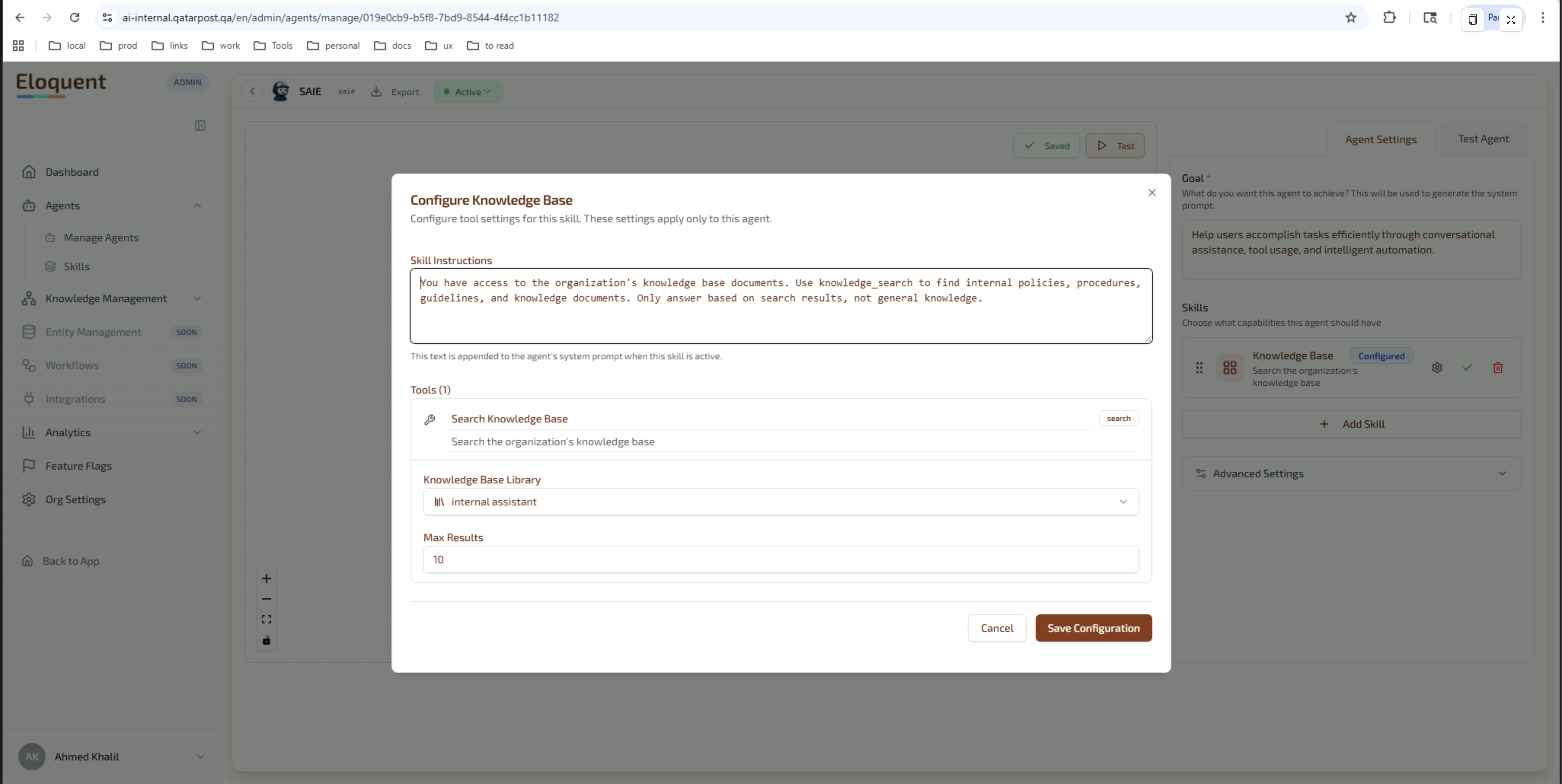
Each skill — shared or branch-specific — carries its own instructions and tools, configured per agent in the Agent Builder:
| Skill | Shared with Website? | Notes |
|---|---|---|
| Track Package | Yes | Same tool. |
| Send Package | Yes | Same tool; payment step adjusted for QR-based off-kiosk payment. |
| Package Delivery | Yes | |
| PO Box | Yes | |
| Pricing | Yes | |
| Branch Locator | Yes | Branch-context awareness adds current branch to the map. |
| Knowledge Base | Yes | Same Qatar Post public knowledge library. |
| Queue Ticket | No | New skill — prints to local printer. |
| Counter Handoff | No | New skill — produces handoff card. |
| Locker Release | No | New skill — gated on QID or OTP. |
8.3 Avatar State as a First-Class Output
In addition to message text, the agent emits avatar state hints (e.g. thinking, celebrating after a successful payment) which the kiosk uses to drive the Rive state machine. This is implemented as a small enum surfaced by the chat protocol; the website widget ignores it, the kiosk uses it.
8.4 Updating the Assistant Without a Site Visit
Branch behaviour can be updated entirely from the Eloquent Admin Console — agents are created, edited, versioned, and toggled live without a kiosk redeploy:
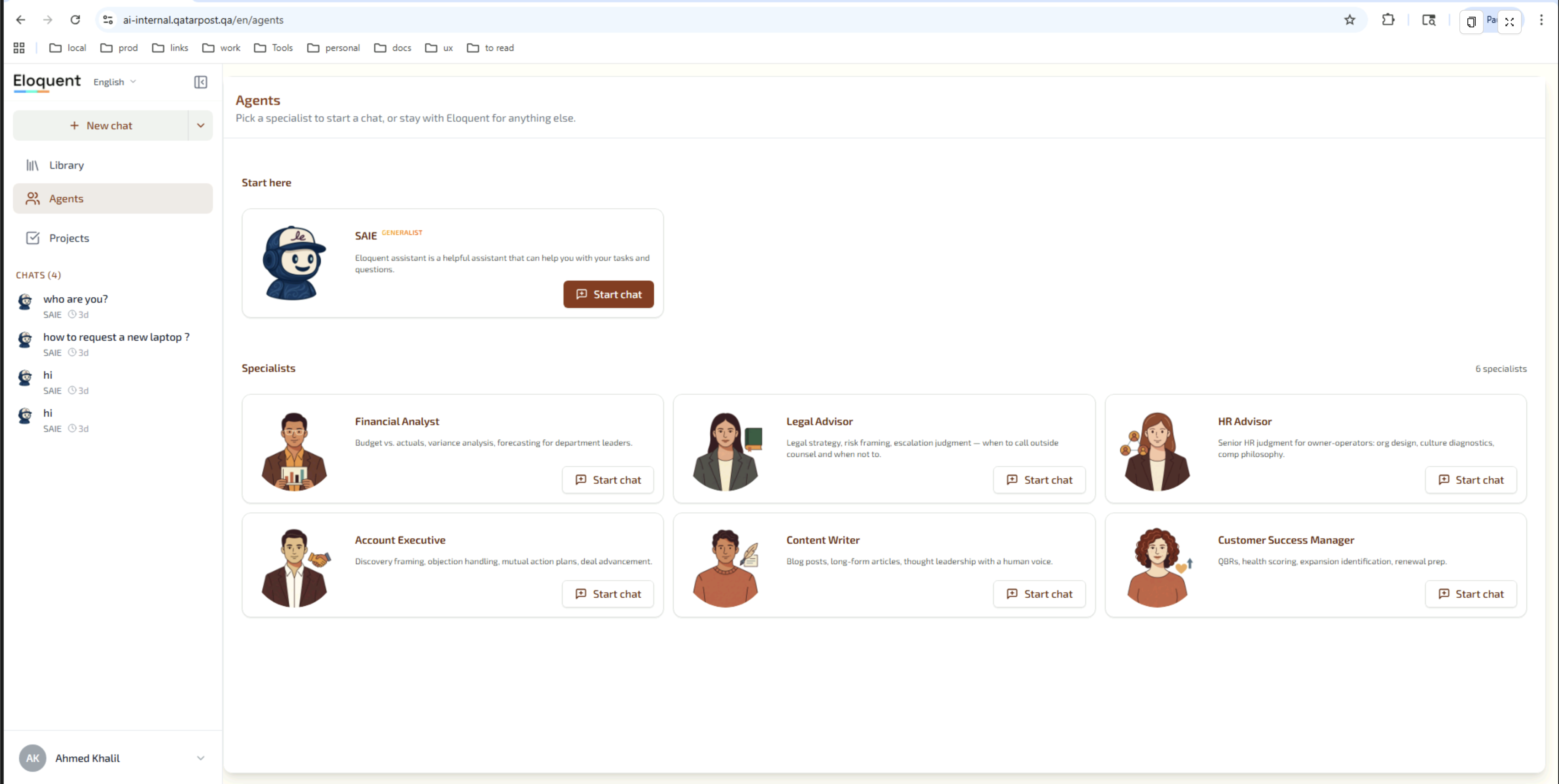
Specifically, owners can:
- Adjust the agent’s goal, prompts, and skill instructions.
- Add a new skill (and its matching kiosk-side rendering).
- Roll back via version history.
- A/B test prompt changes across a subset of branches if the deployment supports per-branch agent overrides.
No kiosk redeploy is required for prompt or skill changes — only the chat surface configuration is pulled at session start.
9. Backend Integration
9.1 Eloquent Chat Service
Streaming AI responses, tool calls, conversation persistence, and avatar-state hints — all delivered by the Eloquent chat service over HTTPS / SSE.
9.2 Azure Speech Services
- Speech-to-Text: Azure Cognitive Services Speech SDK, locales
ar-QAanden-US. - Text-to-Speech: Azure TTS with bilingual voice profiles.
- Both are wired through the existing
useAzureSpeechhook used by the Website Assistant; the kiosk re-uses the same code path.
9.3 Qatar Post APIs
Same set as the Website Assistant:
- Public: Track & Trace, Pricing.
- OTP-gated: Forward / Hold, PO Box, OTP send/validate.
9.4 Branch-Specific Peripherals
Where present, the kiosk integrates with local hardware over a small device-driver layer:
| Peripheral | Used by | Required? |
|---|---|---|
| Touchscreen | All flows | Yes |
| Microphone (array) | Voice loop | Yes |
| Speakers | TTS | Yes |
| Thermal printer | Send (label), Queue ticket, Counter handoff, Receipt | Optional but recommended |
| QID card reader | Optional QID identity binding | Optional |
| Locker controller | Locker Release flow | Optional |
| Camera | Future: receipt / barcode scan | Optional, future |
10. Non-Functional Requirements
10.1 Hardware & Deployment Profile
The Branch Assistant is a software product; the kiosk hardware is sourced and certified separately. The recommended baseline profile:
| Component | Recommended |
|---|---|
| Form factor | Free-standing portrait kiosk or wall-mounted landscape, 32”–43” touchscreen. |
| Touch | Capacitive multi-touch, 10-point. |
| Compute | Embedded PC, x86 or ARM, capable of running Chromium-class browser with WebGL. |
| Microphone | Beamforming microphone array tuned for branch ambient noise. |
| Speakers | Two-channel front-firing, with environmental volume tuning. |
| Network | Wired Ethernet preferred; Wi-Fi acceptable; both behind branch firewall. |
| Printer | Optional: 80 mm thermal receipt printer. |
| Software | Chromium kiosk-mode browser pointed at the kiosk URL; auto-reboot nightly. |
| Power | UPS-backed; auto-resume on power restore. |
The kiosk runs as a single-page application loaded from the same Eloquent deployment as the other surfaces, in kiosk mode (no browser chrome). Updates are pushed on session start; nightly reboot ensures no kiosk stays on an old build for long.
10.2 Operations & Analytics
Branch Manager Dashboard
Branch Managers access an analytics view scoped to their branch:
- Sessions per day, by hour-of-day, by language.
- Flow usage breakdown (which self-service flows the branch’s visitors complete most).
- Drop-off points (where visitors abandon a flow — useful for prompt tuning).
- Hand-off rate (sessions that ended with a counter handoff vs. sessions that completed at the kiosk).
- Average session duration.
- Voice vs. typed input ratio.
Tenant-Level Analytics
Across all branches, Qatar Post platform admins see:
- Per-branch comparison (Doha Main vs. The Pearl vs. Industrial Area, etc.).
- Per-skill and per-tool success/failure rates.
- Model cost per session and per branch.
- CSAT score where the in-chat survey is enabled.
Live Counter Handoff Queue
Where the Counter Handoff skill is enabled, an optional in-branch dashboard shows the live queue of pending handoffs — counter agents pull the next one and the visitor’s summary card is displayed at the counter terminal.
Debug Mode
A staff-only debug mode (unlocked by a service PIN, not visible to visitors) exposes the AI Brain panel — tool calls, knowledge searches, parameters — for in-branch diagnostics.
10.3 Security & Compliance
- Anonymous-first: no customer account or login required.
- Session wiped on inactivity: chat history, OTP tokens, and any temporary identifiers are cleared from the kiosk after every session.
- No persistent local storage: the kiosk holds no customer PII between sessions.
- OTP-gated mutations: any call that changes a Qatar Post customer record requires a valid in-session OTP token.
- Off-kiosk payments: card data is never entered on the kiosk; payment is delegated to the visitor’s phone via QR code.
- Multi-tenant isolation: the Branch Assistant runs in the same Qatar Post tenant as the other AI surfaces — isolated PostgreSQL schema, isolated ClickHouse database.
- Audit trail: every session and every tool call is logged at the platform.
- Physical security: the kiosk runs in browser kiosk mode with no exit; service maintenance requires a physical key or service PIN.
- Network: all kiosk traffic terminates at the Eloquent edge over HTTPS with certificate pinning.
11. Roadmap & Out-of-Scope
Suggested phasing for Qatar Post to confirm:
- Phase 1 (Pilot): deploy at one flagship branch (e.g. Doha Main). Six shared flows + Queue Ticket + Counter Handoff. Voice-first with keyboard fallback. No card-present payment.
- Phase 2 (Multi-branch rollout): expand to top 5–10 branches. Add Locker Release where lockers are present. Enable per-branch dashboards.
- Phase 3 (Full estate): every QPost branch. Optional QID card reader integration. Optional camera for receipt / barcode scan.
- Future: card-present payment via attached POS reader; integrations with branch queue-management systems; multi-character avatar selection.
Out of scope for v1.0: card-present payment on kiosk, biometric identification, persistent customer profiles on the device.
12. Glossary
| Term | Meaning |
|---|---|
| Branch Assistant | The Eloquent-powered kiosk avatar deployed inside Qatar Post branches. |
| Avatar | The Rive-animated mascot character; head-only and full-body variants. |
| Rive | A vector animation runtime supporting state-machine driven character animation. |
| Idle / Listening / Speaking | The three avatar animation states wired to the conversation. |
| Attract screen | The animated loop shown on the kiosk when no visitor is engaging. |
| Side-car | A panel that opens beside the chat to render a structured flow. |
| Service flow | One of the structured wizards (Track, Send, Hold/Forward, PO Box, Pricing, Locator, Queue Ticket, Counter Handoff, Locker Release). |
| Counter Handoff | A branch-specific skill that prepares a summary card for a human counter agent. |
| OTP | One-time password delivered by SMS; used to gate sensitive operations. |
| QR-based payment | A payment pattern where the visitor scans a QR with their phone to complete payment off-kiosk. |
| AI Brain | The retrieval-transparency panel; hidden behind a service PIN on the kiosk. |
| Skill | An Eloquent capability attached to the agent; each skill has its own instructions and tools. |
| Tool | A specific action inside a skill — calls a backend API, opens a side-car, or drives a peripheral. |
| CSAT | Customer Satisfaction score, captured by an optional in-chat survey. |